



Chandelier Exit: The Volatility-Adjusted Trailing Stop That Keeps You in Trends Without Getting Shaken Out
Overview #
Every futures trader has been there: you catch a clean trend, you're up 20 points on ES, and then a normal pullback takes you out at a 4-point profit. The stop was too tight, placed where price would naturally retrace without the trend being over. You watch the thing resume to where you would have been up 35.
The Chandelier Exit exists specifically for this problem. Chuck LeBeau named it after the image of a chandelier hanging from the ceiling — the stop hangs down from the highest high of the recent window, swaying with price but never dropping until price actually reverses. For a short trade, it's the mirror: the stop floats above the lowest low like a floor that rises as the trade progresses.
What makes CE different from a simple ATR stop is the anchor. Most ATR-based stops trail from the last close or the entry price. CE trails from a rolling swing extreme — the highest high or lowest low over your lookback period. That anchor advances with each new high in an uptrend, creating a stop that tightens organically as the move extends, without you having to manually adjust anything.
The default settings are 22 periods and a 3.0 ATR multiplier. Start there. The rest of this article is about understanding when and why to deviate.
The Chandelier Exit Formula #
The math is simple once you see the two components:
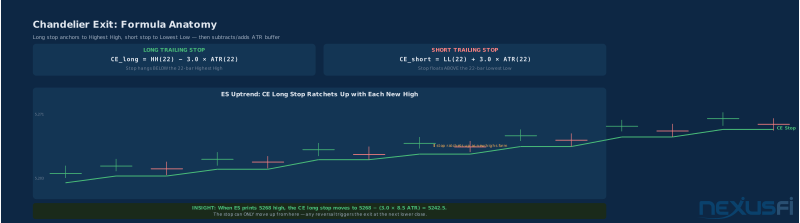
Long trailing stop: CE_long = Highest High(N periods) − k × ATR(N periods)
Short trailing stop: CE_short = Lowest Low(N periods) + k × ATR(N periods)
Where N is your lookback period (default 22) and k is your ATR multiplier (default 3.0).
The long stop "hangs" below the highest high of the last 22 bars. The short stop "floats" above the lowest low of the last 22 bars. In both cases, the ATR-based buffer adjusts automatically to current volatility — when the market is moving big, ATR is high, the stop gives price more room. When the market quiets down, ATR contracts, the stop tightens.
A concrete ES example: if the 22-bar highest high is 5,268 and ATR(22) is 8.5 points, the CE long stop sits at 5,268 − (3.0 × 8.5) = 5,242.5. Price can swing down to 5,242.5 before the exit triggers. If price pushes to a new high of 5,280, the stop automatically advances to 5,280 − 25.5 = 5,254.5.
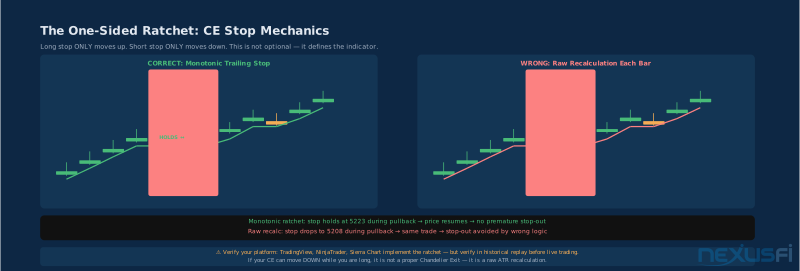
The one-sided ratchet is what makes this work in practice. The long stop can only move up — never down. Even if price pulls back and the HH(22) calculation would produce a lower value, the stop holds at the prior level. This is not a display quirk; it is the defining feature. Without monotonic trailing, CE degenerates into a noisy ATR band that stops you out on every normal pullback.
This ratchet behavior has to be verified on your platform. Most major platforms — NinjaTrader, TradingView, Sierra Chart — implement it correctly. But verify with historical replay before trading live. A CE that drops during your pullbacks is not a Chandelier Exit.
Chuck LeBeau and the Origins #
Chuck LeBeau is one of the pioneers of systematic trading. He co-wrote "Computer Analysis of the Futures Market" with David Lucas in 1992, and his work on trailing stops influenced a generation of system traders. The Chandelier Exit concept emerged from his research on how to stay in winning trend trades longer without giving back excessive profit.
LeBeau's insight was that a stop based on price structure (the highest high or lowest low) was more meaningful than a stop based purely on time or entry price. Markets don't respect your entry price. They do respect structural levels — the highs and lows where significant activity occurred. By anchoring the stop to those levels, CE keeps the trader in during normal volatility while exiting cleanly when actual trend reversal occurs.
As @Fat Tails noted in NexusFi's Elite Circle thread on indicator creation:
"The chandelier stop can be traced back to Charles LeBeau. It is a stop calculated from the highest high (alternatively highest close)..."
The indicator has become standard equipment on virtually every serious trading platform. NinjaTrader includes it natively. TradingView has it. Sierra Chart has it. The wide availability reflects how well the concept has held up over decades of real trading.

CE vs Simple ATR Trailing Stop #
Both indicators use ATR to set stop distance. The difference is what that distance is measured from.
A simple ATR trailing stop typically measures from the most recent close, or from the highest close since entry, or from some moving average of price. The anchor updates every bar based on current price action.
CE measures from the N-bar highest high (or lowest low). This is a structural anchor — it represents where the market actually showed its maximum commitment over the lookback window. The distinction matters in practice:
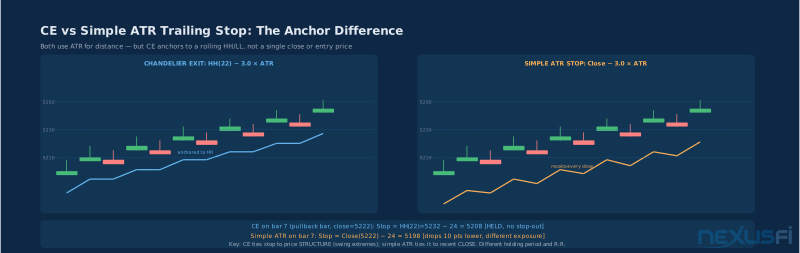
When price pulls back in an uptrend: A simple close-based ATR stop recalculates downward with every lower close, continuously reducing the stop level. CE holds at the prior highest high minus the ATR buffer — it does not move down.
When a new swing high prints: Both stops advance, but CE does so by advancing the HH anchor first, then subtracting ATR. This creates a stop that tracks the swing structure of the market rather than the noise of individual closes.
On a bar where ES pulls back from 5,232 to 5,222, a simple close-based stop at 3.0×ATR(8) would calculate to 5,222 − 24 = 5,198. CE would hold at the prior HH of 5,232 minus 24 = 5,208. That 10-point difference is the margin between getting stopped out on a normal pullback and staying in for the continuation.
@Fat Tails documented this distinction extensively in NexusFi's psychology and money management forum:
"Chandelier Stop: The chandelier stop - also known as chandelier exit - is a classic. It was used by Charles LeBeau, one of the first system traders..."
The practical implication: CE is better at keeping you in clean trends during normal volatility. Simple ATR stops are faster — they tighten more aggressively after moves — which can be useful if you're trading shorter holds and want faster profit protection. Neither is universally superior; the choice depends on your holding period and how you define "normal pullback."
CE vs Parabolic SAR #
Parabolic SAR gets compared to CE constantly because both produce trailing stop levels. They work on completely different principles.
Parabolic SAR is acceleration-based. It starts with a small step size and accelerates toward price as the trend continues. The acceleration factor (AF) controls how quickly SAR catches up. When price crosses SAR, the indicator flips to the other side.
Chandelier Exit is volatility-based. The stop distance is purely a function of ATR and the lookback extreme. There is no acceleration component. The stop moves with the swing extreme, not with a time-based momentum metric.
The behavioral difference becomes clear in ranging markets:
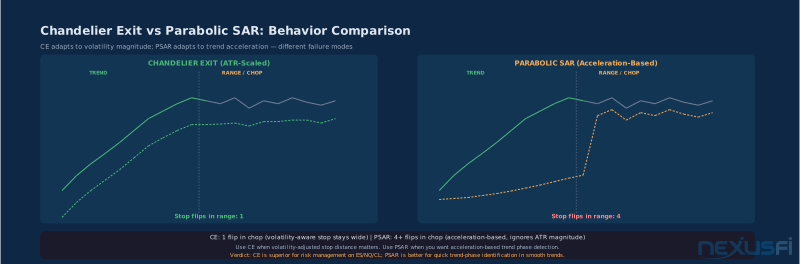
In a choppy, sideways market, PSAR flips repeatedly. Each small move triggers the acceleration mechanism, tightening SAR into price, and the next small reversal crosses it. You can see 4, 5, 6 SAR flips in a 20-bar range. CE, because its stop distance is tied to ATR (which also contracts in ranges), stays wide relative to the oscillations and produces far fewer stop triggers.
In a strong, clean trend, PSAR can sometimes provide an earlier exit signal because the acceleration factor tightens SAR aggressively toward price. CE might trail a bit wider. This is the genuine tradeoff: PSAR gives you earlier exits in smooth trends; CE gives you fewer stop-outs in choppy conditions.
@Fat Tails compared these mechanics in a Traders Hideout thread on SuperTrend logic:
"ATR Trailing Stop: A multiple of the ATR is deducted from the current close. Chandelier Stop A: A multiple of the ATR is deducted from a Donchi... [channel extreme]"
For futures traders managing positions over multiple hours, CE's volatility-awareness is generally more useful than PSAR's acceleration mechanism. PSAR works better for very clean, persistent trends where you want to lock in profits aggressively. CE works better when the instrument has variable volatility — which describes ES, NQ, and CL most of the time.
The One-Sided Ratchet: Why Implementation Matters #
This section exists because traders get burned by this. Read it carefully.
Correct CE implementation uses a monotonic trailing mechanism:
Long stop at each bar:
  raw_CE = Highest High(22) − 3.0 × ATR(22)
  actual_stop = max(actual_stop_prev, raw_CE)  ← ONLY moves up
The max() operation is what makes it a ratchet. If the raw calculation produces a lower value than where the stop was yesterday — because the highest high in the lookback has dropped off — the stop ignores it and stays put.
Without this: every time a strong high bar drops out of the 22-bar window, the HH(22) would reset lower, and the CE level would drop with it. In a multi-day trend, this means the stop would oscillate up and down with the rolling window rather than trailing cleanly above your entry.
Platform verification checklist:
- Enter a long trade in historical replay
- Watch CE during a 3-5 bar pullback
- If CE level decreases during the pullback → not properly ratcheted
- If CE level holds or advances → correctly implemented
@kiasom demonstrated the LeBeau stop logic in EasyLanguage code for NexusFi readers, showing how the highest high anchor is maintained:
"if MP 1 then LBSHlast = LeBeauStopHH ; { LeBeau Stops - Reverse Long to Short } SellShort ( 'SX' ) next bar at LeBeauStopHH stop"
The code explicitly maintains the stop at the prior highest high, updating only when a new high is made. This is the correct behavior, and it is what you need to verify your platform delivers.
Default Parameters: N=22, k=3.0 #
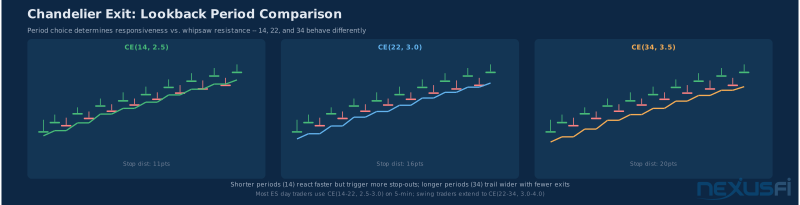
The defaults exist for a reason. 22 periods corresponds roughly to one trading month on daily charts, which is long enough to capture a meaningful swing without going all the way back to the previous major high. The 3.0 multiplier gives approximately 1.5 to 2 standard deviations of buffer below the highest high — enough room for normal volatility while still catching genuine reversals.
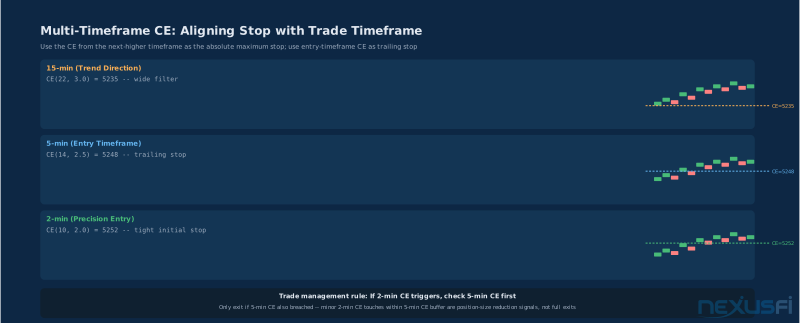
On daily charts for equity futures, these defaults work reasonably well. On intraday charts, 22 bars means 22 bars of whatever your timeframe is — 22 minutes on a 1-minute chart, 22 five-minute bars, etc. The behavior is very different.
N=22 on a 1-minute ES chart: The lookback covers only 22 minutes of trading. The highest high over 22 minutes is recent enough that the stop will trail relatively tightly. In a big directional move, this might be fine. In normal intraday volatility, it may stop you out on minor noise.
N=22 on a 15-minute ES chart: The lookback covers roughly 5.5 hours of trading — more than half the regular session. This stop is going to be wide and slow. It's better suited for tracking multi-day trends.
For most intraday ES/NQ futures traders, something in the N=14-22 range on 5-minute charts provides a reasonable default. The 3.0 multiplier is a good starting point and should be your first adjustment lever before touching N.
@webradio compiled a collection of mechanical stops/exits shared on NexusFi, noting CE as one of the foundational approaches for systematic position management:
"I'm posting here my collection of mechanical stops/exits, borrowed from various sources..."
Calibration for ES, NQ, and CL #
This is where the theory becomes tradeable. The parameters that work in one volatility regime will produce garbage results in another. Here is how to think about each instrument.
ES (S&P 500 E-mini) #
ES has the most predictable volatility behavior of the major index futures. During normal sessions, ATR on 5-minute bars runs 3-5 points. During high-volatility days (CPI, FOMC, major economic data), it can run 8-15+ points.
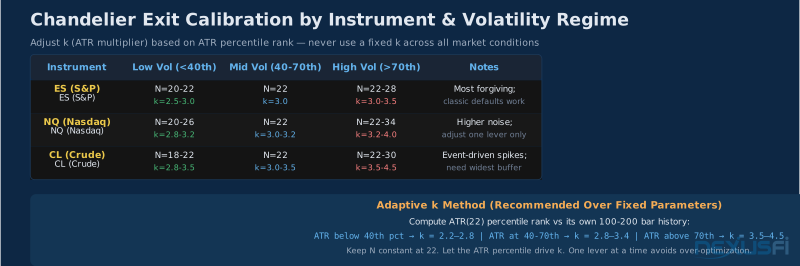
Low volatility session (ATR < 5 points on 5-min):
- N=20-22, k=2.5-3.0
- Stop distance: 2.5 × 4 = 10 points on the low end. This keeps you in clean trends while being responsive enough to catch reversals.
High volatility session (ATR > 8 points on 5-min):
- N=22-28, k=3.0-3.5
- Wider buffer necessary to avoid being stopped out by the larger normal-range swings that occur during volatile sessions.
@bobwest described his approach to ATR-based trailing in the ES thread "Taking loss cutting losers managing positions HOW?":
"...d on a somewhat low multiple of ATR, and get out semi-mechanically, keeping the stop just a little farther from price than the strict ATR, based on my read of volatility, but always being taken out by stop when..."
That "based on my read of volatility" is key. Manual discretion is how most experienced traders handle the regime transition problem. The regime-adaptive approach described below automates it.
NQ (Nasdaq-100 E-mini) #
NQ trades at roughly 2x the volatility of ES on a point-adjusted basis. A 10-point move on ES might correspond to a 40+ point move on NQ. The ratio shifts during vol regime changes.
NQ also has more "microstructure noise" — the order-flow imbalances and small spikes that characterize a thinner, more aggressive market. A k=3.0 that works on ES often produces premature stop-outs on NQ because the per-bar ATR is large enough that even 3×ATR places you too close to the noise band.
NQ starting point: N=20-22, k=3.2-4.0 depending on the session. If you're getting stopped out frequently on what turn out to be continuation moves, increase k first (to 3.5, then 4.0) before lengthening N.
Critical rule: adjust one lever at a time. Increasing both N and k simultaneously makes it impossible to isolate which change is responsible for the behavioral improvement.
CL (WTI Crude Oil Futures) #
CL has the most event-driven volatility of the three. EIA inventory reports, geopolitical developments, and OPEC announcements can produce 1-2% moves in seconds. During these events, ATR can spike dramatically.
CL also has the cleanest trend characteristics of the three instruments — when it trends, it tends to trend hard and long. This makes CE well-suited for CL, but the parameters need to account for both the event-driven spikes and the trend persistence.
CL starting point: N=22, k=3.5 baseline. During inventory report days or major event windows, widen to k=4.0-4.5 or simply stand aside until the volatility resolves.
@grausch noted in the NexusFi "Dynamic Trailing Stop and Profit using ATR" thread:
"...the stop will be closer during periods of low volatility and wider during periods of high volatility. If you size your positions according to your stops..."
That position-sizing link is not accidental — it goes to the position sizing section below.
The Adaptive k Approach #
Rather than manually switching parameters by regime, you can build a simple rule that adjusts k automatically:
- Compute ATR(22) for your instrument and timeframe
- Compute the rolling percentile rank of that ATR value over the last 100-200 bars
- Map the percentile to k:
- Below 40th percentile → k = 2.2-2.8
- 40th-70th percentile → k = 2.8-3.4
- Above 70th percentile → k = 3.5-4.5 (instrument-dependent)
Keep N stable at 22 and let k adapt. This removes the manual regime-switching decision from your workflow and replaces it with a systematic rule that responds to the actual current conditions.
Common Mistakes and Failure Modes #
Understanding why CE fails is as important as understanding how it works.
Mistake 1: Using CE as Your Entry Signal #
CE flips direction only after price has moved significantly. When you're in a range and CE finally triggers long, it often means price has already rallied 80% of the range. You're buying near the top.
CE is an exit tool. It can serve as a directional bias filter — "I only take longs when price is above the CE long stop" — but treating every CE flip as an entry signal produces bad trades. The community found this repeatedly through the brutal teacher of actual trading.
@grausch described the ATR stop philosophy in his "ATR for Stop Loss" thread:
"The reason you would use a multiple of ATR to determine a stop-loss is so that your stops automatically adjust to current volatility levels."
That framing is correct: CE is a stop mechanism, not an entry mechanism. Your entry has to come from somewhere else — price structure, order flow, momentum confirmation.
Mistake 2: Wrong Timeframe Alignment #
This is subtle but kills a lot of CE strategies. N=22 on a 1-minute chart is 22 minutes. N=22 on a daily chart is 22 trading days. The 22-day lookback captures a meaningful monthly cycle. The 22-minute lookback captures roughly one normal intraday swing. These behave completely differently.
When you see a CE setting described somewhere, always ask: what timeframe was the author using? A k=3.0 that works on 15-minute NQ charts may stop you out constantly on 5-minute charts because the ATR-to-noise ratio is completely different.
Calibrate to your actual chart timeframe. Do not copy-paste settings from someone trading a different timeframe.
Mistake 3: Ignoring Platform Differences #
NinjaTrader's "Chandelier Exit" indicator, TradingView's built-in CE, and Sierra Chart's implementation may handle the ratcheting logic slightly differently. Some update the stop intrabar (during the bar's development); others only update on bar close. Some allow the stop to recalculate in both directions without ratcheting.
The easiest test: find a strong trend in historical replay. Watch what happens to the CE level during pullback bars. If it drops, something is wrong with either the implementation or your understanding of it.
Mistake 4: Fixed Parameters in Changing Volatility Regimes #
ES in January during low-volatility drift is not the same market as ES during a major economic event week. A k=3.0 stop that protects your trend in January might stop you out constantly in March. And a k=4.5 stop that works during volatile conditions leaves money on the table when things calm down.
The static-parameter approach requires you to either accept suboptimal performance in some regimes, or manually switch parameters as conditions change. The adaptive k approach described above is the more systematic solution.
@grausch's thread on dynamic ATR-based stops explicitly addresses this:
"...will be closer during periods of low volatility and wider during periods of high volatility. If you size your positions according to your stops, i.e. risk 1% of your capital per trade then position sizes will become smaller when volatility increases..."
Failure Mode: The Stale Extreme #
This one is particularly painful in trend-following. Here's the sequence:
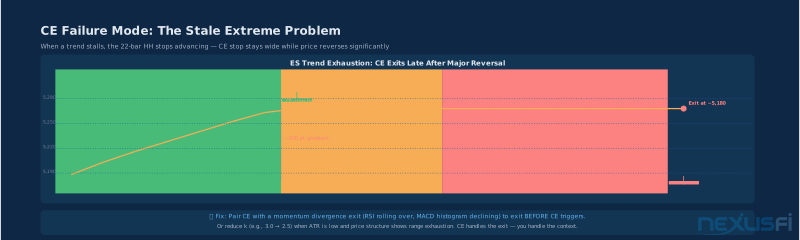
- ES trends up for 15 sessions, hitting new highs consistently
- The trend exhausts and price starts ranging below the prior highs
- CE long stop is anchored to a 22-bar HH from the peak — still wide
- Price starts declining as trend reversal begins
- CE finally triggers after a substantial decline, not the initial reversal
The "stale extreme" occurs when the HH(22) stops advancing because the trend has stalled, but the CE stop stays wide because the old extreme is still in the lookback window. For 22 bars after the peak, you're carrying a stop anchored to that peak minus ATR.
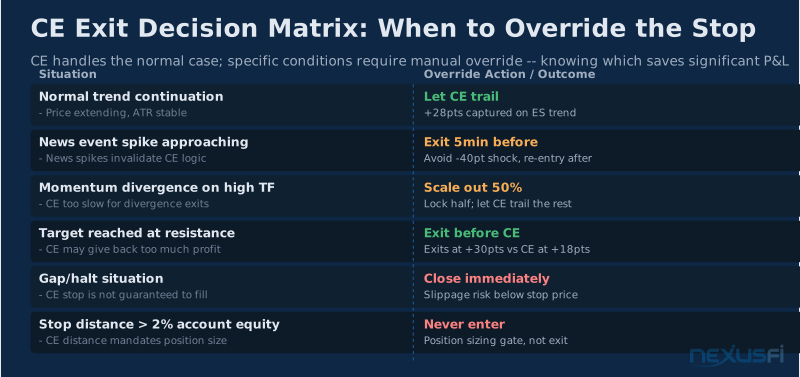
Fix: pair CE with a momentum or trend-health filter. If RSI is diverging at the highs, or MACD histogram is declining, or you're seeing clear structural signs of exhaustion, consider taking partial profits or tightening the stop manually rather than waiting for CE to trigger.
@mewddsltd in the APEX 300K+ trading journal thread:
"...using the ATR dashboard I created .. it defaults to a stop-loss of 2X ATR .. adjust that as you see fit ..."
The manual adjustment is not a weakness — it's recognizing that CE handles the steady-state case well but needs human judgment for structural transitions.
Integration with Confirmation Tools #
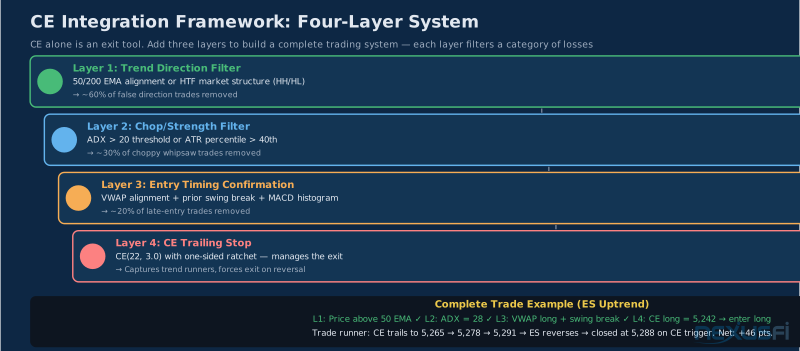
CE is at its best when it's the exit layer of a multi-layer system, not a standalone strategy.
Layer 1: Trend Direction Filter #
The most fundamental filter: only take long trades when price is above your trend indicator, only take short trades when it's below.
EMA stack approach: Use a 50 EMA and 200 EMA on your trading timeframe. When price is above both and the 50 is above the 200, only longs qualify. When price is below both and the 50 is below the 200, only shorts. This eliminates trading against the prevailing trend.
Higher timeframe structure: On a 5-minute chart, look at the 15-minute or 60-minute chart for HH/HL (bullish) or LH/LL (bearish) structure. Trade CE entries only in the direction of the higher-timeframe trend structure.
VWAP: For intraday traders, VWAP alignment provides a session-based trend filter. Price above VWAP = long bias; below = short bias. The simplicity of VWAP makes it easy to combine with CE without adding excessive moving parts.
Layer 2: Chop / Trend Strength Filter #
ADX: ADX measures trend strength regardless of direction. When ADX is below 20, the market is ranging and CE will produce frequent false signals. When ADX is above 25-30, trend conditions exist and CE performs well. Use ADX as a "permission" filter: CE entries only when ADX confirms trend strength.
ATR regime filter: If ATR is contracting and below its recent median, the market is compressing. CE in compression produces stop-outs. Wait for ATR expansion before engaging.
Layer 3: Entry Timing Confirmation #
Since CE is inherently lagging (it responds to confirmed swing extremes), improving entry timing requires a faster signal:
VWAP/structure break: Enter long when price breaks above the prior swing high, with CE confirming the long bias. Don't enter on CE flip alone.
Order flow confirmation: For traders with footprint or depth of market data, waiting for a delta divergence to resolve at a key level provides meaningful confirmation that participants are actually driving the move.
MACD histogram: A simple approach: require the MACD histogram to be positive and expanding before taking CE long entries. This filters out chop entries where CE has crossed to the long side but momentum is still neutral.
@tigertrader described the position sizing layer that connects stops to account management:
"...Now we have the absolute value of our stop, which is $6. Divide the 2% risk capital ($2,000) by $6 and we get our position size..."
This illustrates the correct sequence: confirm direction → confirm strength → calculate stop distance → size position accordingly.
Complete Trade Blueprint #
Entry conditions:
- Price above 50 EMA (long bias confirmed)
- ADX > 22 (trend strength confirmed)
- Prior swing high broken with close (structure confirmation)
- Price above session VWAP (session bias confirmed)
Risk placement:
- Initial stop at CE long stop level OR structure stop (prior swing low), whichever is more conservative
- Size position: risk% × account / (stop distance × $50 per point for ES)
Exit management:
- Let CE trail with ratcheting
- If momentum divergence appears, take partial profits at 50%
- Full exit on CE stop trigger
After stop-out:
- Wait for a new structural setup
- Do not re-enter immediately just because price returns to the CE level
Position Sizing with CE Stop Distance #
Here's the part most traders skip, and it costs them real money.
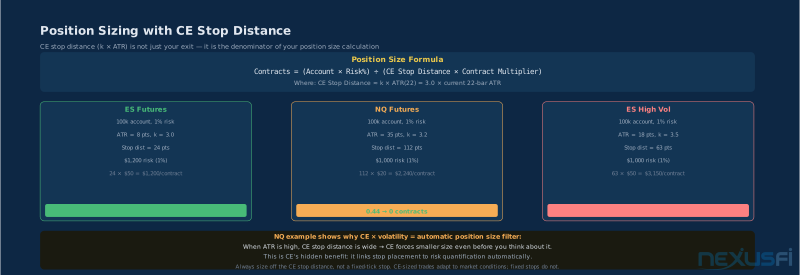
CE provides a direct, quantifiable stop distance: k × ATR. This is not just your exit level — it is the denominator of your position size calculation.
The formula:
Contracts = (Account Balance × Risk%) ÷ (CE Stop Distance × Contract Multiplier)For ES with a 1% risk parameter on a $100,000 account:
- ATR(22) = 8 points, k = 3.0 → CE stop distance = 24 points
- Risk budget = $100,000 × 1% = $1,000
- Contract multiplier = $50/point
- Contracts = $1,000 ÷ (24 × $50) = $1,000 ÷ $1,200 = 0.83 → 0 contracts (round down) or wait for tighter setup
For NQ with the same account and parameters:
- ATR(22) = 35 points, k = 3.2 → CE stop distance = 112 points
- Risk budget = $1,000
- Contract multiplier = $20/point
- Contracts = $1,000 ÷ (112 × $20) = $1,000 ÷ $2,240 = 0.44 → skip
This is where CE becomes a natural position filter. In high-volatility environments, CE stop distance widens, which automatically reduces your position size under fixed-risk rules. You are not consciously "trading smaller in high vol" — the math enforces it.
@Fadi described the ATR-based position sizing logic in the "Optimum account size" thread:
"Let's say you chose to trade the ES future contract on the 60min chart, and today its corresponding ATR(14) is around 5 points. I personally let my stop distance be..."
Size your position from the CE stop distance, not from a fixed tick count. CE-sized trades adapt to the actual market conditions; fixed 10-tick stops do not. Fixed stops might be inside the noise band on a volatile day and outside the range on a quiet day. CE stops adjust automatically.
@Fat Tails documented the NinjaTrader PositionSizer tool that computed stop distances based on ATR multiples across different instruments:
"...G: The stop loss calculated from volatility: Mean of minimum and maximum ATR + spread H: The selected stop loss..."
The professional approach: every position size is a function of the stop, and every stop is a function of current volatility. CE provides the stop; ATR provides the volatility; your risk% provides the budget. The math does the rest.
When CE Works and When It Doesn't #
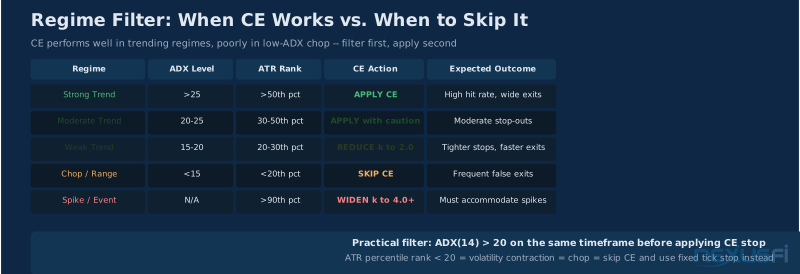
CE works best in:
- Trending markets with sustained directional momentum
- Instruments with consistent volatility behavior (ES in normal conditions)
- Swing trading timeframes where the lookback window captures meaningful structure
- Trend-following systems where holding through pullbacks is the strategy
CE struggles in:
- Ranging, mean-reverting markets (frequent HH/LL changes, smaller ATR still wide relative to range)
- Very short holding periods where the 22-bar lookback is larger than your intended trade duration
- News-driven markets with event spikes that create artificial HH/LL levels
- Positions entered near the top/bottom of a move where CE is already at an extreme
The two cases where CE specifically fails futures traders:
1. Range-bound sessions: On an ES range day where price oscillates 8 points, a CE long stop based on a 2-day high might sit 25 points below current price. Technically correct but operationally useless — if you're ranging, CE is telling you nothing.
2. Position entered late in a trend: If you buy ES when it has already run 40 points, CE is anchored to the 22-bar high that includes all 40 of those points. Your stop is deep below current price. You're carrying maximum risk on a position with minimum upside.
Fix for both: context. CE provides a mechanical exit. You provide the trade selection context. Only enter CE-managed trades when the setup is early in a move, not late.
Platform-Specific Implementation Notes #
NinjaTrader 8: The built-in Chandelier Exit indicator implements the ratchet correctly by default. The "Use Close" parameter determines whether the indicator uses the close price or the high/low for its calculations. Standard CE uses highs/lows — verify this setting. In Strategy Builder, you can access CE values programmatically to build entries off the CE signal.
TradingView: The "Chandelier Exit" script by @everget (most widely used implementation) implements the ratchet correctly. The original published version uses close prices for both the lookback extreme and the ATR calculation — verify it uses actual highs/lows if you want the traditional LeBeau formulation.
Sierra Chart: Available under "Chandelier Stop" in the study list. Default parameters match the traditional 22/3.0 setup. The ratchet is implemented correctly. Offers separate inputs for ATR period and lookback period, which allows independent adjustment of each.
@Fat Tails addressed a specific NinjaTrader implementation question about CE behavior in safe mode:
"...uses the high points of the candles of the chandelier. If you run a strategy on NinjaTrader, you will probably run in safe mode, that is set to 'CalculateOnBarClose = true'. In that case NinjaTrader should adju..."
The CalculateOnBarClose setting affects whether CE updates during bar development (aggressive) or only on confirmed closes (conservative). For mechanical trading, CalculateOnBarClose=true is standard and reduces the effect of intrabar noise on your exit decision.
Knowledge Map
Prerequisites
Understand these firstGo Deeper
Build on this knowledgeReferences This Article
Articles that build on this topicCitations
- — Want your NinjaTrader indicator created, free? (2013) 👍 14“The chandelier stop can be traced back to Charles LeBeau. It is a stop calculated from the highest high”
- — Calculating Stop and Profit Target via ATR (2012) 👍 17“Chandelier Stop: The chandelier stop - also known as chandelier exit - is a classic. It was used by Charles LeBeau, one of the first system traders.”
- — Logic that creates the SuperTrend Indicator (2019) 👍 8“ATR Trailing Stop: A multiple of the ATR is deducted from the current close. Chandelier Stop A: A multiple of the ATR is deducted from a Donchian channel extreme”
- — Want your NinjaTrader indicator created, free? (2015) 👍 6“Have a look at the Chandelier Stop and the SuperTrend. The chandelier stop deducts a multiple of the ATR from the highest high in an uptrend”
- — Trail Stop (2012) 👍 3“uses the high points of the candles of the chandelier. If you run a strategy on NinjaTrader, you will probably run in safe mode, that is set to CalculateOnBarClose = true”
- — AVERAGE TRUE RANGE (2013) 👍 14“a chandelier stop (see Chuck Le Beau for definition). Use a simple trailing stop based on ATR”
- — collection of mechanical stops/exits (2017) 👍 13“I'm posting here my collection of mechanical stops/exits, borrowed from various sources. Please help me growing it!”
- — Dynamic Trailing Stop and Profit using ATR (2015) 👍 4“the stop will be closer during periods of low volatility and wider during periods of high volatility. If you size your positions according to your stops”
- — ATR for Stop Loss (2016) 👍 1“The reason you would use a multiple of ATR to determine a stop-loss is so that your stops automatically adjust to current volatility levels”
- — Taking loss cutting losers managing positions HOW? (2021) 👍 7“on a somewhat low multiple of ATR, and get out semi-mechanically, keeping the stop just a little farther from price than the strict ATR”
- — trailing stop la LeBeau (2010) 👍 2“if MP 1 then LBSHlast = LeBeauStopHH { LeBeau Stops - Reverse Long to Short } SellShort SX next bar at LeBeauStopHH stop”
- — APEX 300K+: The Journey (2023) 👍 2“using the ATR dashboard I created .. it defaults to a stop-loss of 2X ATR .. adjust that as you see fit”
- — Optimum account size (2013) 👍 4“Let's say you chose to trade the ES future contract on the 60min chart, and today its corresponding ATR(14) is around 5 points”
- — NYSE $TICK AND $ADD (2011) 👍 8“Now we have the absolute value of our stop, which is $6. Divide the 2% risk capital ($2,000) by $6 and we get our position size”
- — PositionSizer for ninjatrader (2010) 👍 12“G: The stop loss calculated from volatility: Mean of minimum and maximum ATR + spread H: The selected stop loss”