



NinjaTrader: The Futures Trading Platform That Does Everything From One Screen
Overview #
NinjaTrader isn't just a charting package with some execution bolted on. It's a full trading workstation — charting, order execution, strategy development, backtesting, and trade management all running inside a single .NET application. For futures traders who want one platform that handles the entire workflow from idea to execution to automated exit, NinjaTrader 8 is the default choice for a reason.
That reason is the SuperDOM and ATM combination. No other retail platform matches the tight integration between price ladder execution and automated trade management. You click a price on the DOM, and your pre-defined stop loss, profit targets, trailing stops, and break-even rules all fire instantly — no extra clicks, no separate windows, no hoping you remembered to set your stop.
But NinjaTrader isn't perfect. The NinjaScript learning curve is real if you're not a C# developer. Order flow tools require paid add-ons. And Sierra Chart beats it on raw execution speed. Understanding where NinjaTrader excels — and where it doesn't — saves you from the most expensive mistake in platform selection: choosing based on marketing instead of workflow fit.
Key Concepts #
Before getting into the platform's architecture, here are the terms that matter:
SuperDOM (Depth of Market) — NinjaTrader's price ladder interface. Shows bid/ask volume at each price level, allows one-click order placement, and displays real-time P&L. This is where most active futures traders spend their day.
ATM Strategy (Advanced Trade Management) — Pre-configured rules for stop losses, profit targets, trailing stops, and break-even automation. ATMs attach to orders automatically, removing the need for manual exit management.
NinjaScript — NinjaTrader's C#-based programming language for creating custom indicators, strategies, and add-ons. Built on the .NET framework with a full IDE including IntelliSense, debugging, and compilation. If you're coming from EasyLanguage, see our guide on strategy development languages.
Chart Trader — An overlay on the chart window that lets you place and manage orders directly from the price axis. Useful for traders who prefer visual order management over DOM-based execution.
Strategy Analyzer — NinjaTrader's backtesting engine. Runs historical simulations, walk-forward tests, Monte Carlo analysis, and optimization sweeps on NinjaScript strategies.
Market Analyzer — A configurable watchlist that aggregates real-time data across instruments with custom indicator columns, alerts, and conditional formatting. Think of it as a scanner built into the platform.
Workspace — A saved layout of charts, DOMs, and windows. NinjaTrader supports multiple workspaces for different trading scenarios — one for pre-market analysis, another for active scalping, a third for end-of-day review.
Platform Architecture #
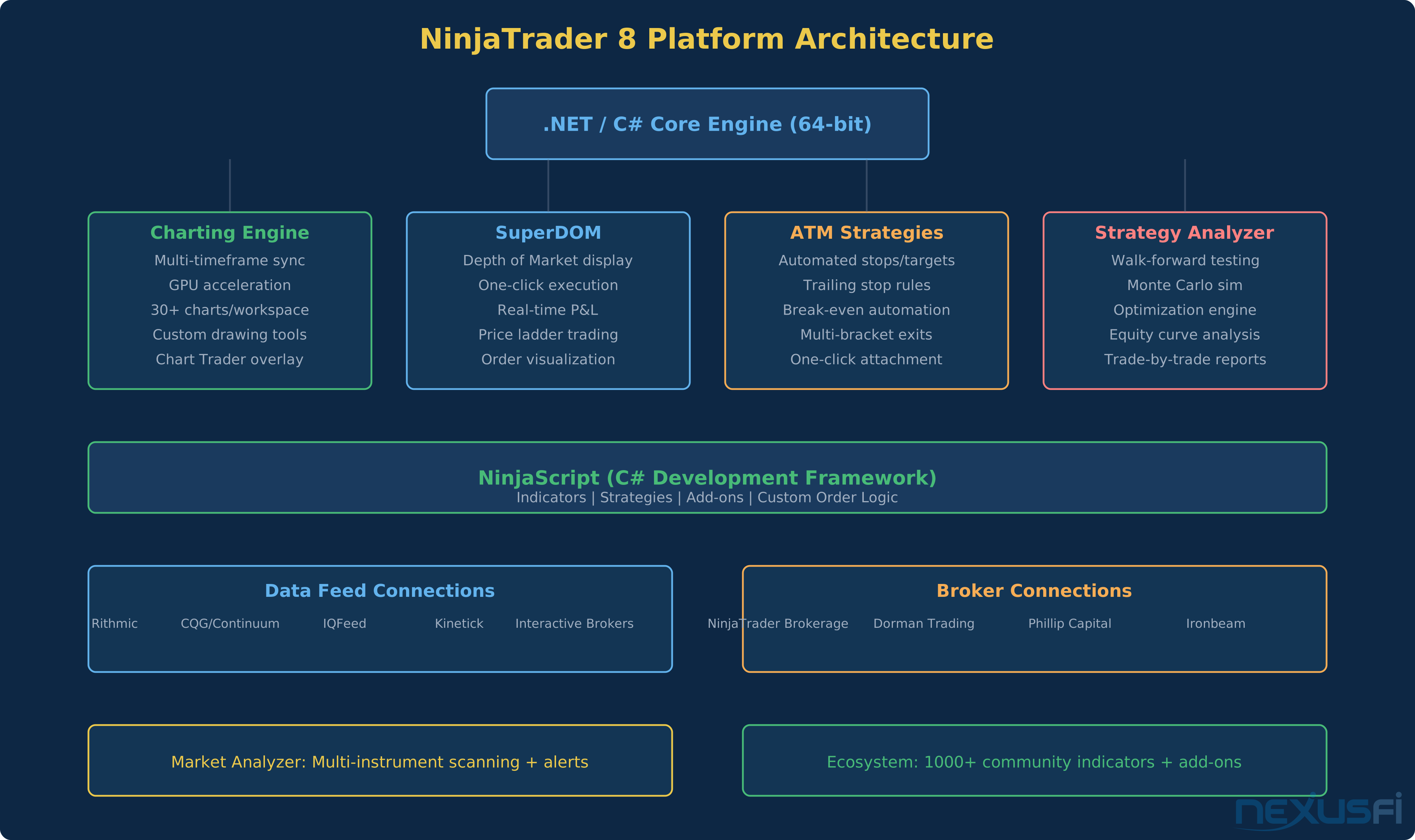
NinjaTrader 8 runs on a 64-bit .NET engine — a complete rewrite from the older NinjaTrader 7. The architecture matters because it determines what the platform can and can't do well.
The core is event-driven. Market data flows in through your data feed connection, hits NinjaTrader's internal processing engine, and fans out to every chart, indicator, DOM, and strategy simultaneously. GPU acceleration handles the charting load, which is why NinjaTrader can render 30+ charts simultaneously without choking on a modern system.
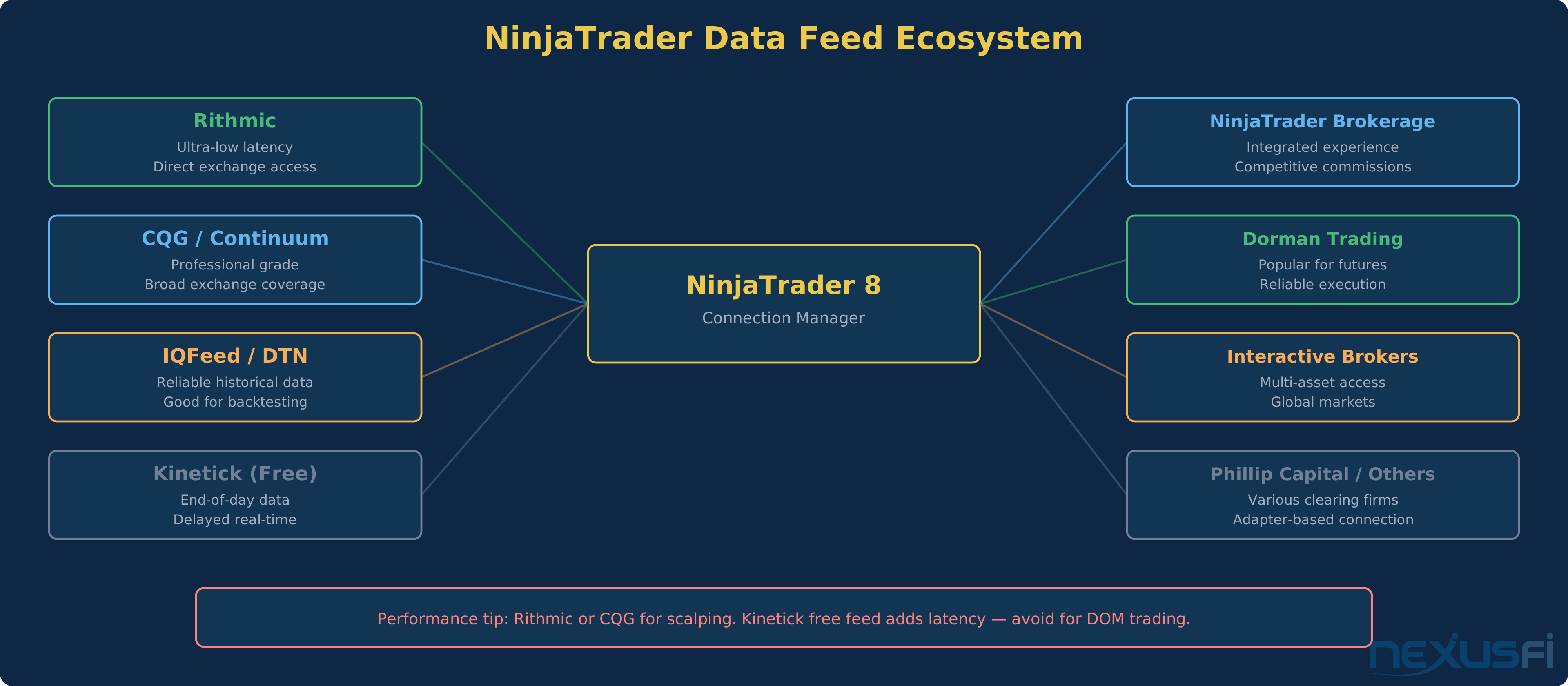
Everything connects through a centralized Connection Manager. You configure your data feed (Rithmic, CQG, IQFeed, Kinetick, or others), your broker connection, and your account. Switch between simulation and live trading by changing one dropdown. The platform automatically maps symbols and handles session templates, which saves real time when you're juggling multiple instrument connections.
The NinjaScript layer sits on top of this engine. Every indicator you see on a chart, every strategy running in the background, and every custom tool in the ecosystem uses the same NinjaScript framework. This creates consistency — a strategy that works in backtesting uses identical logic in simulation and live trading. The event model is the same throughout.
One architectural decision worth noting: NinjaTrader processes data on a minimum 100ms update cycle.
For swing traders and most day traders, 100ms is invisible. For scalpers watching every print, it's worth understanding this constraint.
The SuperDOM #
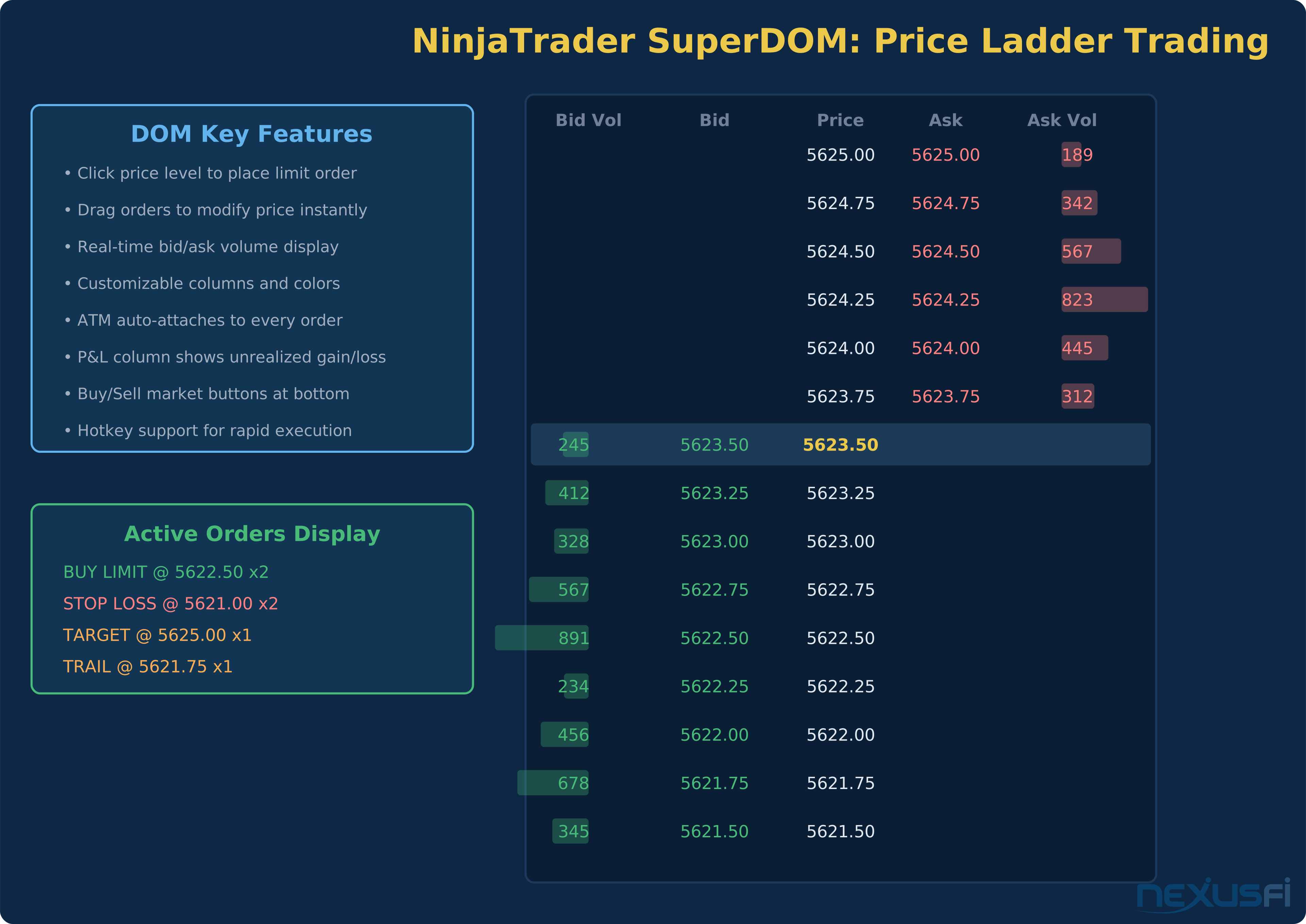
The SuperDOM is NinjaTrader's flagship execution interface, and the forum discussions make one thing clear — traders who switch to NinjaTrader often cite the DOM as the reason they stayed.
Here's what the SuperDOM actually does in a trading session:
Price Ladder Display. Every price level shows the current bid and ask volume. The ladder scrolls with the market by default, or you can lock it to keep your working orders visible. Volume bars give you a visual read on where size is stacking. For a deeper look at price ladder trading across platforms, see our DOM trading platforms guide.
One-Click Order Entry. Click on the bid column to place a buy limit. Click on the ask column to place a sell limit. Click the market buttons to fire a market order. Every click can automatically attach your pre-configured ATM strategy — stops, targets, trailing logic, all of it.
Order Visualization. Working orders appear directly on the ladder with color-coded markers. Drag an order to a new price level to modify it instantly. The DOM shows your average entry price, unrealized P&L, and position size in real time.
Customization. Column layouts, color schemes, font sizes, price increment buttons, quantity selectors — the SuperDOM is highly configurable. Most traders spend a few hours setting it up once, then never touch the settings again.
That metaphor captures the tradeoff precisely. The DOM is powerful, but the sheer number of configuration options can overwhelm someone who just wants to place a trade.
Where the SuperDOM falls short is advanced order flow analysis. As community member @josh noted, NinjaTrader's DOM "is still far behind Sierra" for features like cumulative delta visualization and advanced print analysis.[3] If your edge depends on reading order flow at the tick level, NinjaTrader's built-in tools need supplementing with paid add-ons — or you need a different platform entirely.
ATM Strategies #
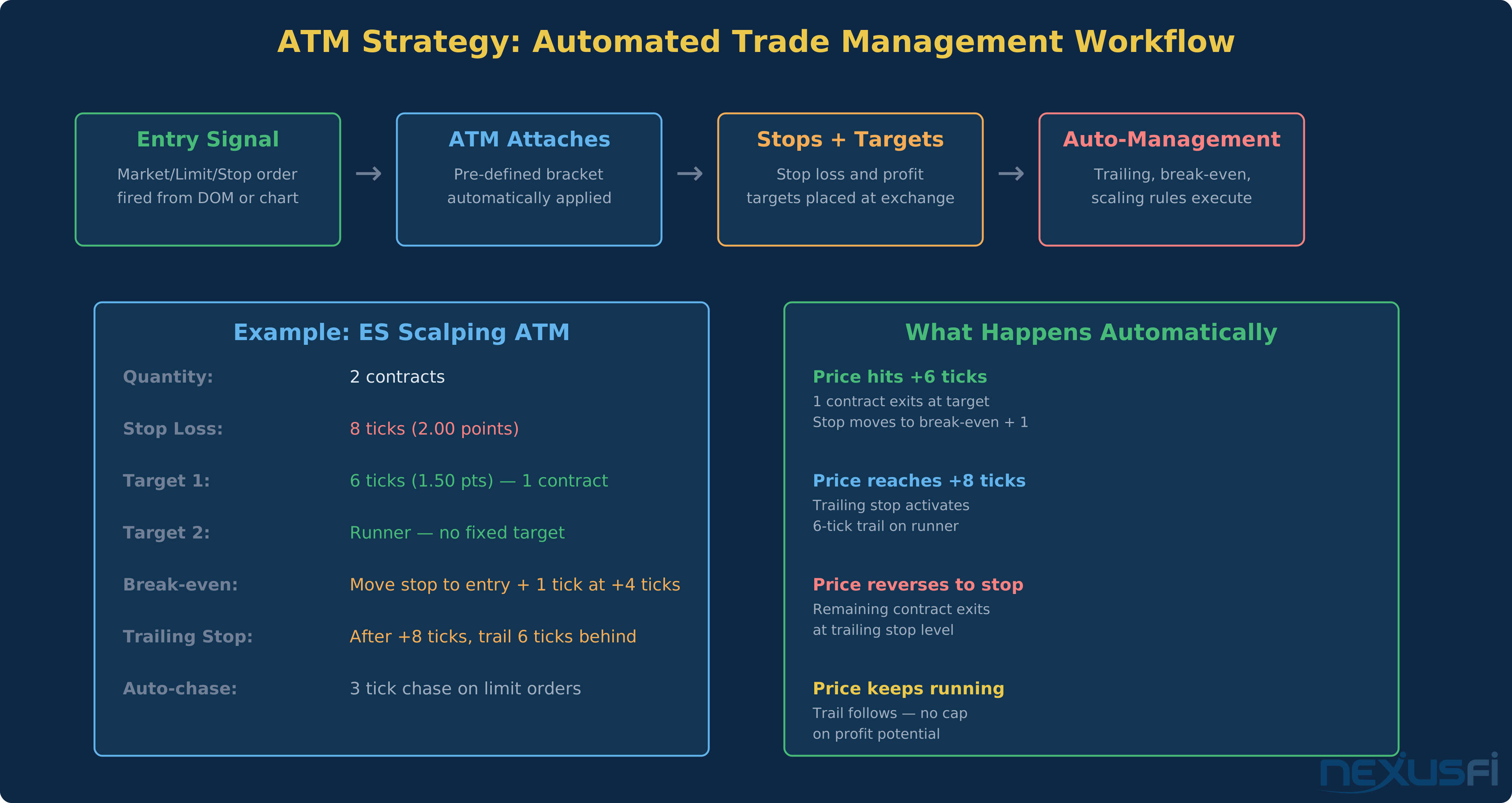
ATM strategies are what separate NinjaTrader from "just another charting platform." The concept is simple: define your exit rules once, attach them to every trade automatically, and let the platform manage the exits while you focus on entries.
Here's what an ATM strategy actually controls:
Stop Loss. Fixed distance from entry. Can be set in ticks, points, or percentage. Once placed, the stop sits at the exchange — it's not a software-only stop that fails when NinjaTrader disconnects.
Profit Targets. One or multiple targets at defined distances. Multi-target ATMs let you scale out — take partial profits at the first target while letting a runner continue with a trailing stop.
Break-Even Stop. Automatically moves your stop to entry price (plus or minus an offset) once the trade reaches a specified profit threshold. The most common ATM configuration for scalpers: move stop to break-even + 1 tick after the trade goes 4-6 ticks in your favor.
Trailing Stop. After reaching a trigger distance, the stop trails behind price by a fixed amount. Multiple trailing strategies are available — simple trail, step trail, and custom logic through NinjaScript.
A two-contract ES setup might take 1.50 points on the first contract and trail the second with no fixed target — all configured once and fired with a single click.
Common ATM configurations futures traders actually use:
- ES Scalp: 2 contracts, 8-tick stop, Target 1 at 6 ticks (1 contract), trailing stop on runner
- NQ Day Trade: 2 contracts, 20-tick stop, break-even at +8, trail 12 behind after +16
- CL Swing: 1 contract, 15-tick stop, no target, 10-tick trail activated at +20
NinjaScript Development #
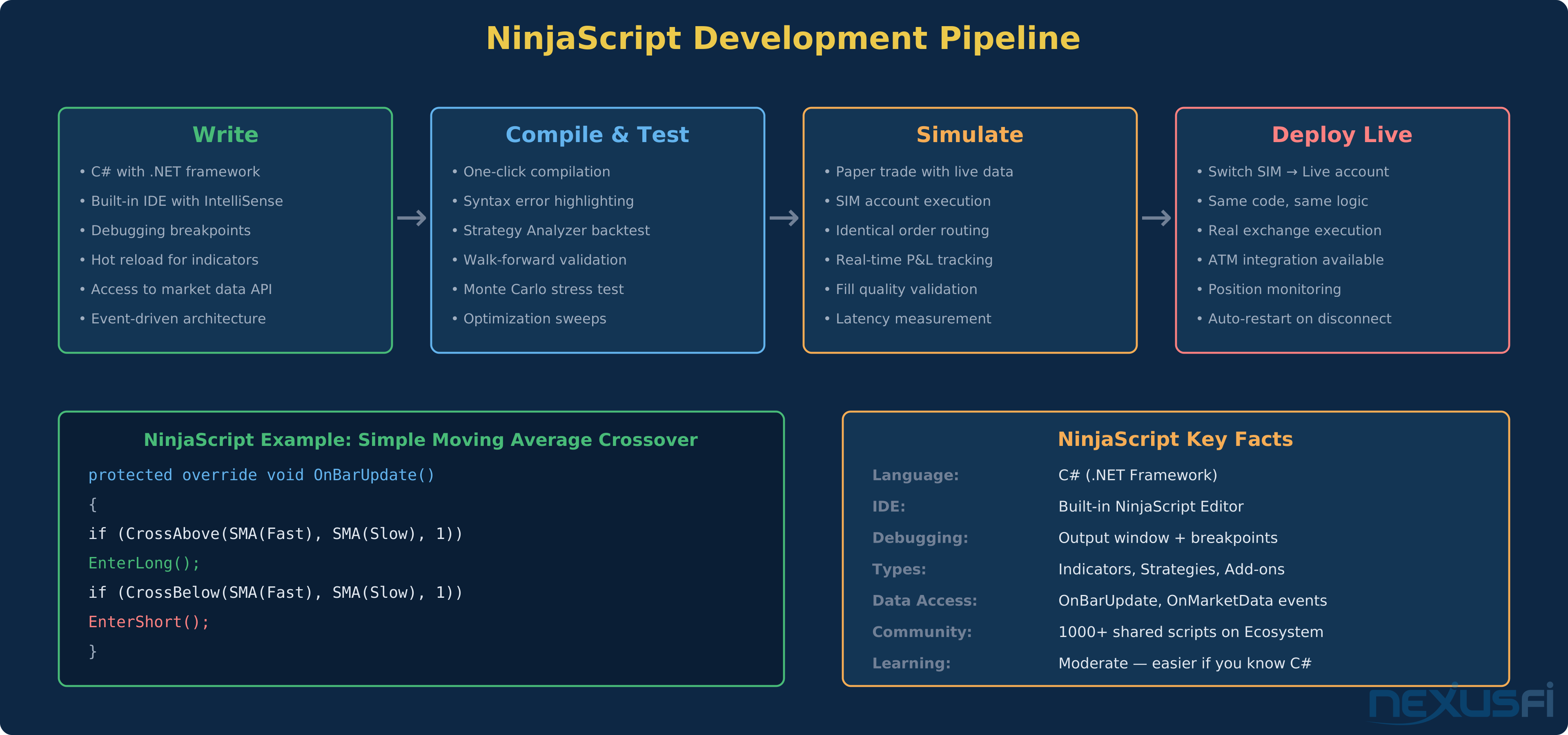
NinjaScript is C# with NinjaTrader-specific APIs layered on top. If you've written C# before, NinjaScript feels familiar immediately. If you haven't, the learning curve is real — but it's the learning curve of a real programming language, not a proprietary toy syntax.
The built-in NinjaScript Editor provides IntelliSense (auto-complete), syntax highlighting, compilation output, and debugging through the Output window. It's not Visual Studio, but it's functional enough for most development work. For complex projects, you can develop in Visual Studio and compile externally.
What NinjaScript can build:
- Indicators — Custom studies that run on charts and in the Market Analyzer
- Strategies — Automated trading logic with full entry/exit management
- Add-ons — Custom windows, tools, and integrations that extend the platform
- Drawing tools — Custom chart annotations and visual aids
The event-driven model centers on OnBarUpdate() for bar-based logic and OnMarketData() for tick-level processing. Strategies inherit from the Strategy base class, which provides order management methods (EnterLong(), EnterShort(), ExitLong()), position tracking, and performance accounting.
In a later post,
The community ecosystem extends NinjaScript's reach much. Over 1,000 indicators and strategies are shared through the NinjaTrader Ecosystem marketplace — some free, many paid. Quality varies. As with any marketplace, you're buying someone else's code with varying levels of documentation and support.
One genuine limitation: debugging automated strategies in live conditions is harder than debugging indicators. Strategies manage state across multiple bars, handle partial fills, and interact with the broker — all of which create edge cases that only surface in live execution. The simulation environment handles most of these, but not all. The gap between backtest and live execution is a function of how carefully you model fills and slippage, not a flaw in NinjaScript itself.
Strategy Analyzer and Backtesting #
NinjaTrader's Strategy Analyzer runs historical simulations on NinjaScript strategies with a visual interface that makes it accessible even if you're not a quantitative developer.
What the Strategy Analyzer provides:
- Standard backtest metrics: Net profit, max drawdown, profit factor, win rate, average trade, Sharpe ratio
- Visual equity curve: See the P&L trajectory over time, including drawdown periods
- Trade-by-trade analysis: Every entry and exit with timestamps, prices, and individual P&L
- Walk-forward testing: Divide historical data into in-sample and out-of-sample periods to test parameter robustness
- Monte Carlo simulation: Randomize trade sequence to estimate probability of ruin and confidence intervals
- Optimization: Sweep parameter ranges to find optimal values — with the standard caveat about overfitting
The backtesting engine runs on tick, minute, or daily bar data depending on what's available. CPU utilization scales with data granularity — tick-level backtests on years of data will push a quad-core system. The visual heat map of performance across parameter combinations helps identify strong parameter zones versus overfitted peaks.
Fill assumptions matter. NinjaTrader's default fill model assumes your limit orders fill when price touches your level. In reality, you need price to trade through your level and you need your order to reach the front of the queue. For strategies that depend on limit order fills — most scalping systems — the backtest will overstate performance unless you add conservative slippage.
[8] The Strategy Analyzer is mature — it's been refined through years of user feedback. It handles bar-based and trend-following strategies well. For microstructure-dependent strategies, Sierra Chart or dedicated quantitative frameworks offer more granular modeling.
Data Feeds and Connectivity #
NinjaTrader doesn't generate its own market data. It connects to external data feed providers, and the quality of your trading experience depends heavily on which feed you choose.
Rithmic — The standard for low-latency futures data. Direct exchange connectivity with sub-100ms fills when paired with a quality broker. Most professional NinjaTrader users trade through Rithmic. If you're scalping or trading from the DOM, this is the feed to use.
CQG / Continuum — Professional-grade data with broad exchange coverage. Strong historical data quality. Slightly higher latency than Rithmic for some instruments, but more reliable for international markets.
IQFeed (DTN) — Excellent for historical data and backtesting. Reliable real-time feed with good coverage. Popular with traders who prioritize strategy development over ultra-fast execution.
Kinetick — NinjaTrader's free end-of-day data service with delayed real-time streaming. Adequate for learning the platform and running backtests. Not suitable for live trading — the delay makes DOM trading unusable.
Interactive Brokers — Workable but with known integration issues.
[9] This isn't universal, but it's a commonly reported friction point.
The practical recommendation: start with Kinetick for learning. Switch to Rithmic or CQG through your futures broker when you go live. If your broker provides a choice, Rithmic is the default for execution quality in North American futures.
Pricing Model #
NinjaTrader's pricing structure has evolved over the years, but the core proposition remains: you can use the platform for free as long as you don't need live execution.
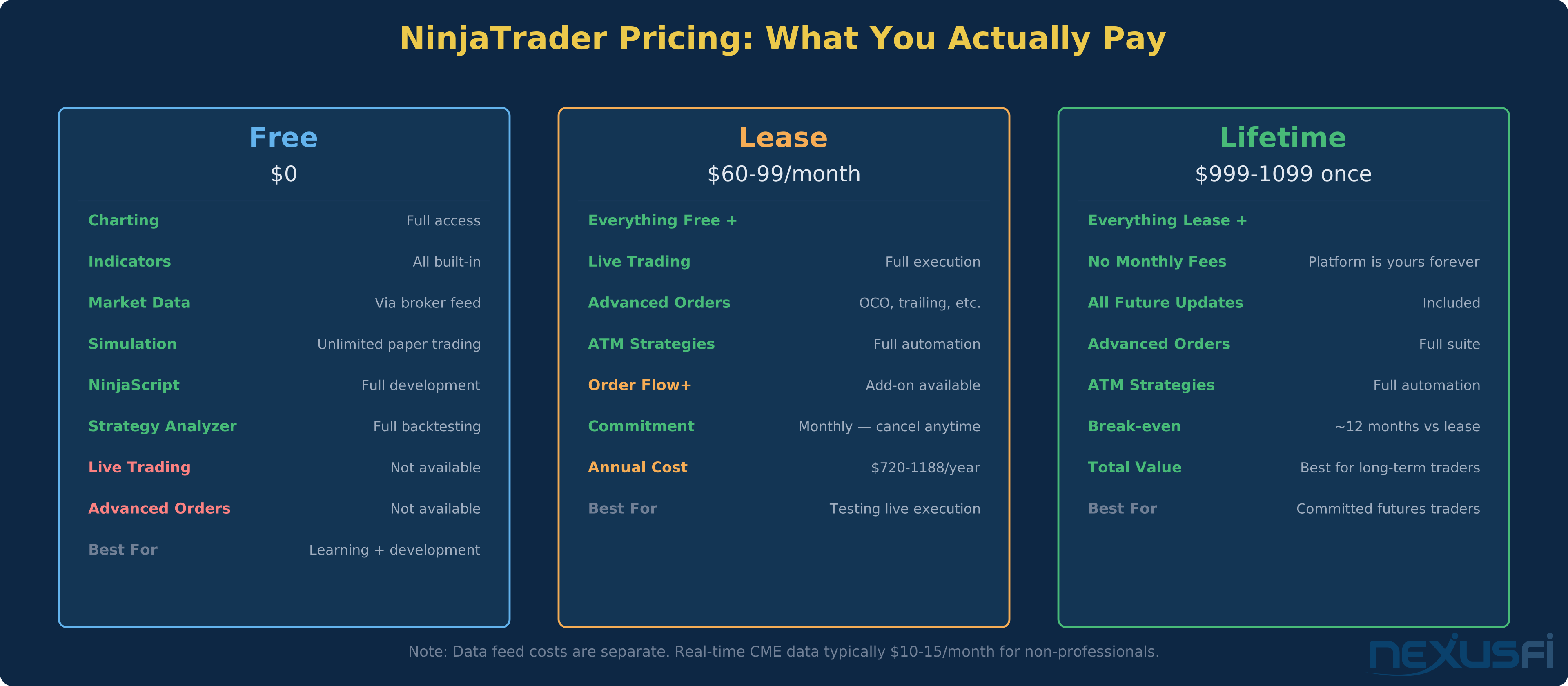
Free Tier — Full charting, all built-in indicators, Strategy Analyzer with backtesting, NinjaScript development, and unlimited paper trading. No live order execution. This is a genuinely useful free tier — not a crippled demo. Many traders spend months in simulation learning the platform before paying anything.
Lease — Monthly subscription ($60-99/month depending on features) that unlocks live trading, advanced order types, and ATM strategies. Flexible commitment — cancel anytime. The break-even versus buying the lifetime license is roughly 12-14 months.
Lifetime License — One-time payment of $999-1099 that includes all features permanently, including future updates. For traders who plan to use NinjaTrader for more than a year, the math is straightforward.
Add-ons — Order Flow+ and other premium features are sold separately, either as subscriptions or one-time purchases. A full NinjaTrader setup with Order Flow tools can push past $1,500-2,000 total.
Data costs are separate. Real-time CME data runs approximately $10-15/month for non-professional traders. Add ICE, Eurex, or other exchanges and the data bill grows.
The total cost of ownership through NinjaTrader Brokerage can be competitive — but compare total costs (platform + data + commissions) not just individual line items.
One cost consideration that rarely appears in marketing: the "free" platform with NinjaTrader Brokerage includes commission rates that embed platform cost into your per-trade fees. Serious volume traders often save money by buying the lifetime license and using an external broker with lower per-contract rates.
Platform Comparison #
NinjaTrader vs Sierra Chart #
Sierra Chart is NinjaTrader's most direct competitor for serious futures traders. Built on a C++ engine, Sierra Chart prioritizes raw performance and granular customization over ease of use.
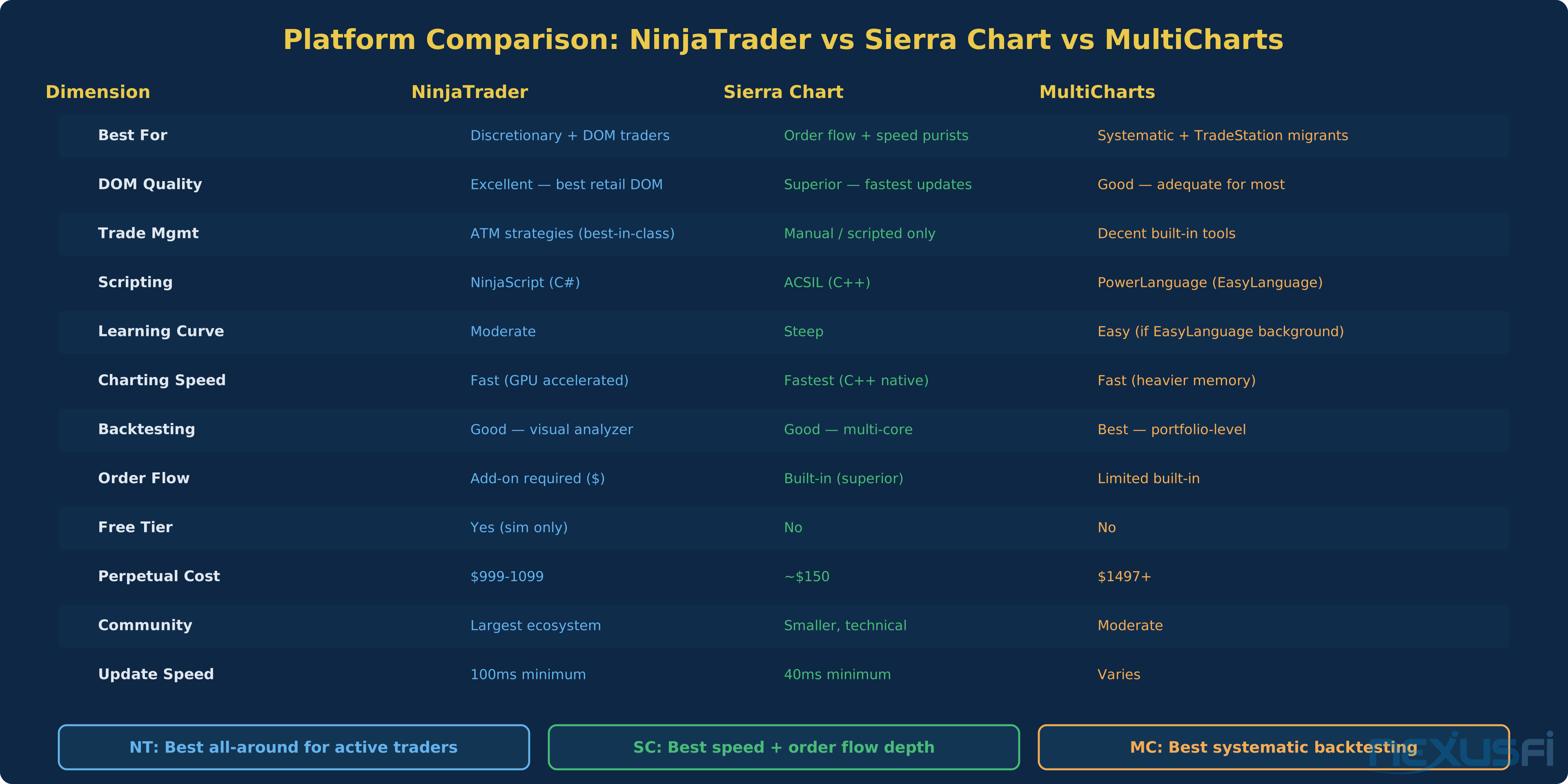
Speed. Sierra Chart updates at 40ms minimum versus NinjaTrader's 100ms. For most traders, this difference is imperceptible. For scalpers watching every print in the DOM, it's meaningful.
Order Flow. Sierra Chart's built-in order flow tools — footprint charts, cumulative delta, DOM analysis — are more thorough than NinjaTrader's. NinjaTrader requires the Order Flow+ add-on (paid) to approach similar functionality, and even then, Sierra Chart's implementation is deeper.
Trade Management. NinjaTrader's ATM strategies have no equivalent in Sierra Chart. Sierra Chart requires scripted solutions for automated exit management, which is more powerful in theory but more work in practice.
Development. NinjaScript (C#) is more accessible than Sierra Chart's ACSIL (C++). The learning curve for ACSIL is steep — but C++ means Sierra Chart can do things that .NET platforms can't touch in terms of performance.
Cost. Sierra Chart's perpetual license is roughly $150 versus NinjaTrader's $999+. If cost sensitivity is high and you don't need ATM strategies, Sierra Chart provides more per dollar.
Bottom line: NinjaTrader for traders who value integrated trade management and a modern UI. Sierra Chart for traders who value raw speed, deep order flow analysis, and low cost.
NinjaTrader vs MultiCharts #
MultiCharts targets a different trader profile — systematic developers, especially those migrating from TradeStation.
Scripting. MultiCharts uses PowerLanguage, which is basically EasyLanguage. If you have TradeStation scripts, they port to MultiCharts with minimal changes. NinjaScript requires rewriting in C#.
Backtesting. MultiCharts' portfolio backtester handles multi-instrument, multi-strategy testing at a level of sophistication that NinjaTrader's Strategy Analyzer doesn't match. For systematic trading research, MultiCharts has the edge.
Execution. NinjaTrader's SuperDOM and ATM system provide a better discretionary trading experience. MultiCharts' execution tools are adequate but less refined.
Cost. MultiCharts starts at $1,497 for a perpetual license — higher than NinjaTrader's $999-1099. Subscription options are also available.
Bottom line: NinjaTrader for discretionary and mixed discretionary/systematic traders. MultiCharts for pure systematic strategy developers, especially TradeStation veterans.
Who NinjaTrader Is For #
Active discretionary futures traders who trade from the DOM and want automated exit management. This is NinjaTrader's core audience, and the platform serves them exceptionally well.
Systematic traders comfortable with C# who want to develop, backtest, and deploy strategies without switching between multiple applications. The development-to-deployment pipeline is smooth and well-integrated.
Traders who want to start free and grow into a paid platform as they develop their skills. The free tier is genuinely functional, not a marketing gimmick.
Who should look elsewhere:
- Pure order flow traders who need footprint charts, delta analysis, and sub-40ms updates. Sierra Chart serves this audience better at lower cost.
- Portfolio-level systematic traders who need multi-instrument backtesting with EasyLanguage compatibility. MultiCharts is the stronger choice.
- Traders on underpowered systems. NinjaTrader's .NET engine with multiple workspaces can stress older hardware. Minimum recommended: quad-core CPU, 16GB RAM, SSD storage.
That's the honest daily experience — NinjaTrader isn't magic, but it's a thoroughly competent platform that handles the full trading workflow without forcing you to compromise on any single dimension.
Getting Started #
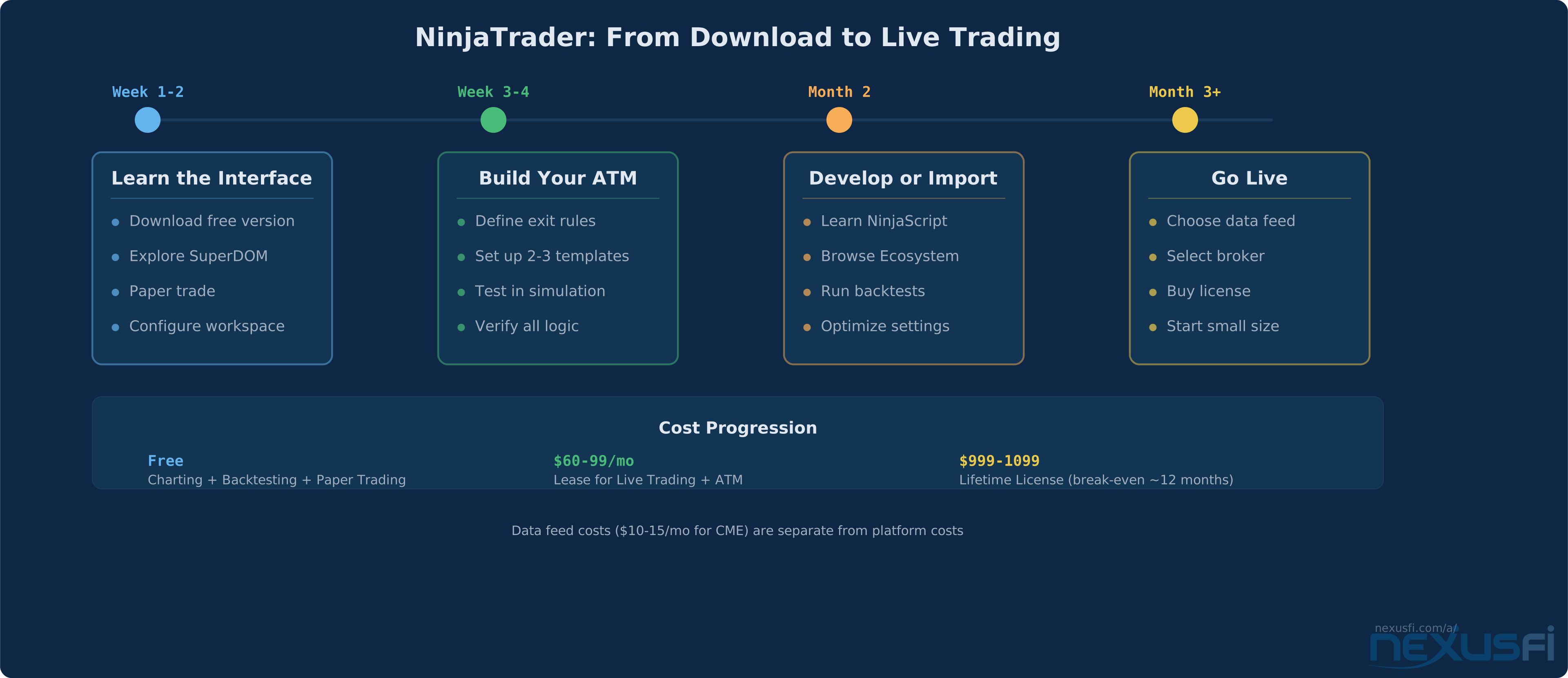
The path from download to live trading follows a predictable sequence:
Week 1-2: Learn the interface. Download the free version. Open the SuperDOM, Chart Trader, and a few charts. Place paper trades. Get comfortable with workspace management. This is the exploration phase — don't improve anything yet.
Week 3-4: Build your ATM. Define your exit rules based on your trading style. Set up 2-3 ATM templates for different market conditions. Paper trade with the ATMs attached. Verify that stops, targets, and trailing logic all behave as expected.
Month 2: Develop or import. If you code, start building indicators and strategies in NinjaScript. If you don't, explore the Ecosystem marketplace for tools that fit your approach. Run backtests on anything you plan to trade live.
Month 3+: Go live. Choose your data feed (Rithmic or CQG recommended). Select your broker. Purchase a lease or lifetime license. Start with small size — the gap between simulation and live execution always produces surprises.
The one piece of advice that comes up repeatedly on NexusFi: validate your execution setup before committing capital. Run the same strategy in simulation and live with small size simultaneously. Compare fills, slippage, and order handling. The platform is solid — but broker-specific quirks and data feed behavior only surface under real conditions.
Knowledge Map
Prerequisites
Understand these firstGo Deeper
Build on this knowledgeReferences This Article
Articles that build on this topicCitations
- — Ninja Trader or Sierra Charts (2013) 👍 5“NT has a minimum update time of 100ms, whereas Sierra's is more than 2X lower at 40ms.”
- — Considering leaving Ninjatrader behind (2022) 👍 5“NinjaTrader is like a Formula 1 race car compared to other platforms. High performance has a cost. A lot of maintenance.”
- — Recommendations of DOM platforms (2020) 👍 5“NT DOM is still far behind Sierra for cumulative delta visualization and advanced print analysis.”
- — Buy Stops / Sell Stop and ATM Strategies (2011) 👍 5“An ATM can split your position across multiple targets with different stop and profit rules for each slice.”
- — My NQ Trading Journal (2024) 👍 2“Don't use a target, focus on your entry only and use an automated trailing stop of say 50 ticks via an ATM strategy.”
- — Can anyone tell me what is so good about Ninja Trader? (2020) 👍 6“I'd say NinjaTrader is the most powerful, and developer-friendly place to be, for Futures trading.”
- — Can anyone tell me what is so good about Ninja Trader? (2021) 👍 4“I am a hard-core developer, and so the integration of C# makes NT8 the best retail development platform on the planet.”
- — Considering leaving Ninjatrader behind (2022) 👍 6“I've used NinjaTrader since it was NinjaTrader 6.5. NinjaTrader8 was built based on client feedback over the years.”
- — Left Ninjatrader looking for a new platform (2020) 👍 10“IB doesn't work well with NT. Slow data, lagging orders.”
- — Can anyone tell me what is so good about Ninja Trader? (2025) 👍 3“VERY low commissions especially with the full license. Very low margins required on the Futures they support.”
- — Can anyone tell me what is so good about Ninja Trader? (2020) 👍 7“I wouldn't go so far as to say it's so good, but it gets the job done and I have everything set up.”