



Futures Order Routing and Execution Quality: What Happens Between Click and Fill
Overview #
Every futures trade starts the same way — you click a button. What happens between that click and your fill confirmation is where money gets made or lost, and most retail traders never think about it.
The path from your trading platform to CME's matching engine in Aurora, Illinois involves multiple hops, risk checks, and network segments. Each hop adds latency. Each millisecond of latency changes the price you get. For scalpers working 1-2 tick edges, the difference between a 5ms fill path and an 80ms fill path can be the difference between a winning and losing strategy.
This isn't about high-frequency trading. You don't need co-location or FPGA hardware. But understanding where your orders go and how your broker routes them gives you a real edge in reducing slippage, improving fill rates, and choosing infrastructure that matches your trading style.
Key Concepts #
Order Management System (OMS) — The software layer at your broker that receives your order, validates it against your account (margin, position limits, risk parameters), and routes it to the exchange. Every broker has one. The quality varies enormously.
Direct Market Access (DMA) — A routing method where your order goes almost directly to the exchange with minimal intermediary processing. The broker still performs risk checks, but they're thin and fast — often sub-millisecond. DMA is the standard for serious futures traders.
Co-location — Placing your trading server physically inside or immediately adjacent to the exchange's data center. CME's matching engines sit in Aurora, Illinois. A server in that building communicates with the exchange in microseconds instead of milliseconds.
Latency — The time delay between sending your order and it reaching the exchange. Measured in milliseconds (ms) for most retail setups, microseconds for co-located systems. Lower is always better.
Fill quality — A composite measure of how well your orders execute. Includes fill rate (percentage of limit orders that get filled), slippage (difference between expected and actual fill price), and reject rate.
Order Management System (OMS) — The software layer at your broker that receives your order, validates it against your account (margin, position limits, risk parameters), and routes it to the exchange.
Matching engine — The exchange's core software that pairs buy and sell orders. CME Globex processes millions of messages per second with sub-millisecond matching. It's FIFO (first in, first out) for orders at the same price — queue position matters.
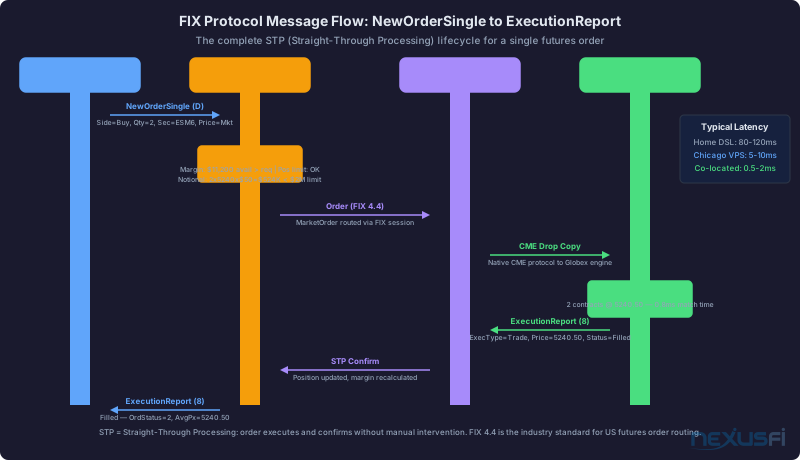
FIX Protocol — The Financial Information eXchange protocol is the standardized messaging language used between trading platforms and exchanges. When you click "buy," your platform sends a NewOrderSingle message (FIX message type 35=D) containing your instrument, side, quantity, and price. The exchange responds with ExecutionReport messages (35=8) that confirm receipt, report fills, or relay rejections. CME Globex primarily uses FIX 4.2 for order routing. Every order you send and every fill you receive is a FIX message under the hood — your platform just translates them into the buttons and blotter entries you see on screen.
Straight-Through Processing (STP) — The automation of the entire order lifecycle from submission through execution, allocation, and clearing with minimal manual intervention. In a well-built STP pipeline, your order flows from platform to FCM risk checks to exchange matching to clearing allocation to settlement without a human touching it. When STP breaks — due to account mismatches, stale data, or risk check failures — orders get delayed or rejected.
Futures Commission Merchant (FCM) — The licensed intermediary between you and the exchange ecosystem. Your FCM receives your order, performs pre-trade risk checks, routes it to the exchange, and — critically — guarantees your trade to the clearinghouse. Through a process called novation, the clearinghouse treats your FCM as the counterparty, not you. This means your FCM's financial strength directly affects the safety of your positions. As @bobwest noted in a [NexusFi discussion on Teton order routing][7], brokers like NinjaTrader have their own clearing FCM, while others route through FCMs like Phillip Capital or Dorman.
Order routing infrastructure — The network of servers, connections, and protocols between your platform and the exchange. Includes your internet connection, your broker's data centers, and the dedicated lines connecting brokers to exchanges.
The Order Path: Click to Fill #
What really happens when you submit a market buy on ES:
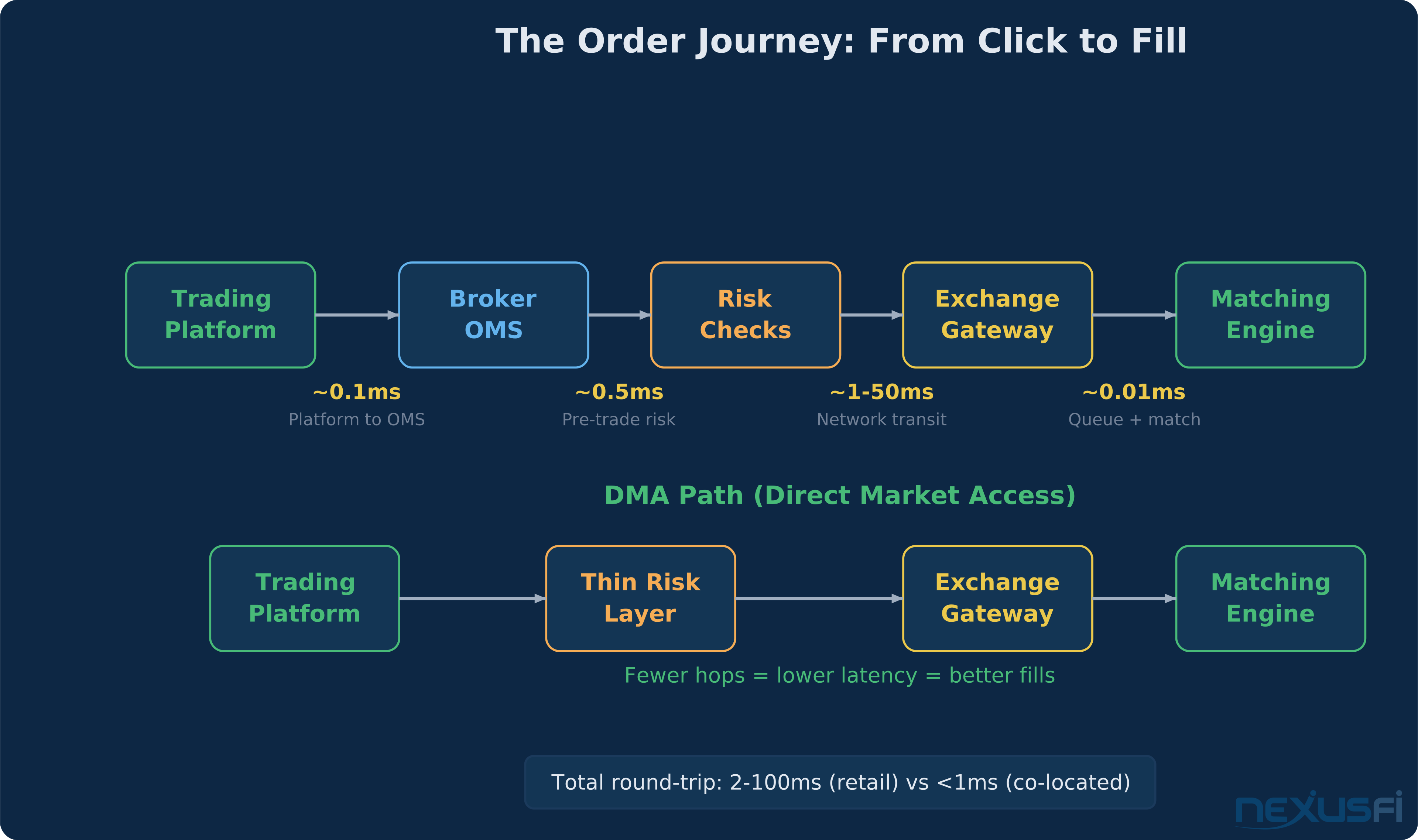
Step 1: Platform sends order. Your trading platform (NinjaTrader, Sierra Chart, TradingView, whatever) serializes your order into a FIX NewOrderSingle message and sends it to your broker's API endpoint. The message carries a unique ClOrdID (tag 11) that tracks this specific order through its entire lifecycle. If you're using a native API like Rithmic's RAPI, this is fast — under 0.1ms locally. Web-based platforms add overhead.
Step 2: Broker OMS receives and validates. Your broker's order management system checks: Do you have enough margin? Is this within your position limits? Are there any risk flags on your account? This step takes 0.1-5ms depending on the broker's infrastructure.
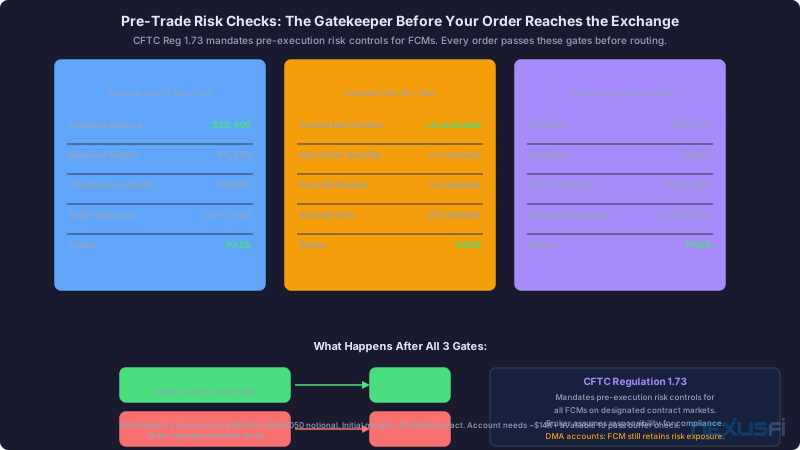
Step 3: Pre-trade risk checks. This is where the real gatekeeping happens. Your FCM's risk engine runs a battery of checks before your order goes anywhere near the exchange:
- Margin validation: The system calculates your projected margin requirement if this order fills — initial margin for the new position plus maintenance margin on existing positions. If the total exceeds your available equity, the order is rejected. For ES, initial margin runs around $12,000-15,000 per contract depending on the FCM — try to buy 10 contracts in a $50,000 account and the math won't work.
- Position limits: Contract-level net position checks against both exchange-imposed limits and the FCM's internal limits. CME sets reportable position levels (currently 1,000 contracts for ES), but your FCM likely sets a much tighter cap based on your account size and credit profile.
- Notional value checks: The system calculates total dollar exposure — price times quantity times contract multiplier. For ES at 5,600, one contract represents $280,000 in notional exposure. FCMs cap aggregate notional to prevent a single account from accumulating outsized risk, especially in volatile or illiquid products where margin models might lag intraday stress.
- Price reasonability bands: Fat-finger protection that rejects orders with prices dramatically outside the current market. If ES is trading at 5,600 and you submit a limit buy at 56,000, the risk engine catches it.
- Order velocity throttles: Rate limits on messages per second to prevent runaway algorithms from flooding the exchange.
All of these checks must pass before the order advances. A well-built FCM runs them synchronously in under 1ms. A slower implementation can take 5-10ms. Either way, the order is dead in the water until every check clears.
Step 4: Network transit to exchange. Your broker's server sends the order across its network connection to CME's gateway in Aurora. This is where geography dominates. A broker with servers in downtown Chicago (350 E. Cermak) has a 1ms connection to Aurora. A broker routing through servers in New Jersey adds 7-15ms. As @SMCJB explained in a [NexusFi discussion on VPS locations][1], "You also need to think about price feed/data routing. Some data vendors have the price data route through their own servers at their offices before going to you."
Step 5: Exchange gateway and matching. CME's gateway validates the order and feeds it to the Globex matching engine. This step is sub-millisecond — the exchange is fast. Your order enters the queue at its price level and waits for a match (limit) or gets filled immediately against resting orders (market).
Step 6: Fill confirmation returns. The exchange sends back a FIX ExecutionReport (35=8) containing your fill price, quantity, and the exchange-assigned OrderID. This message travels back through the same path in reverse. Your FCM updates your position and margin in real time — this is STP at work. Total round-trip for a market order: 2ms (co-located) to 100ms+ (home PC on residential internet).
DMA vs Intermediary Routing #
Not all brokers route orders the same way. The two main models:
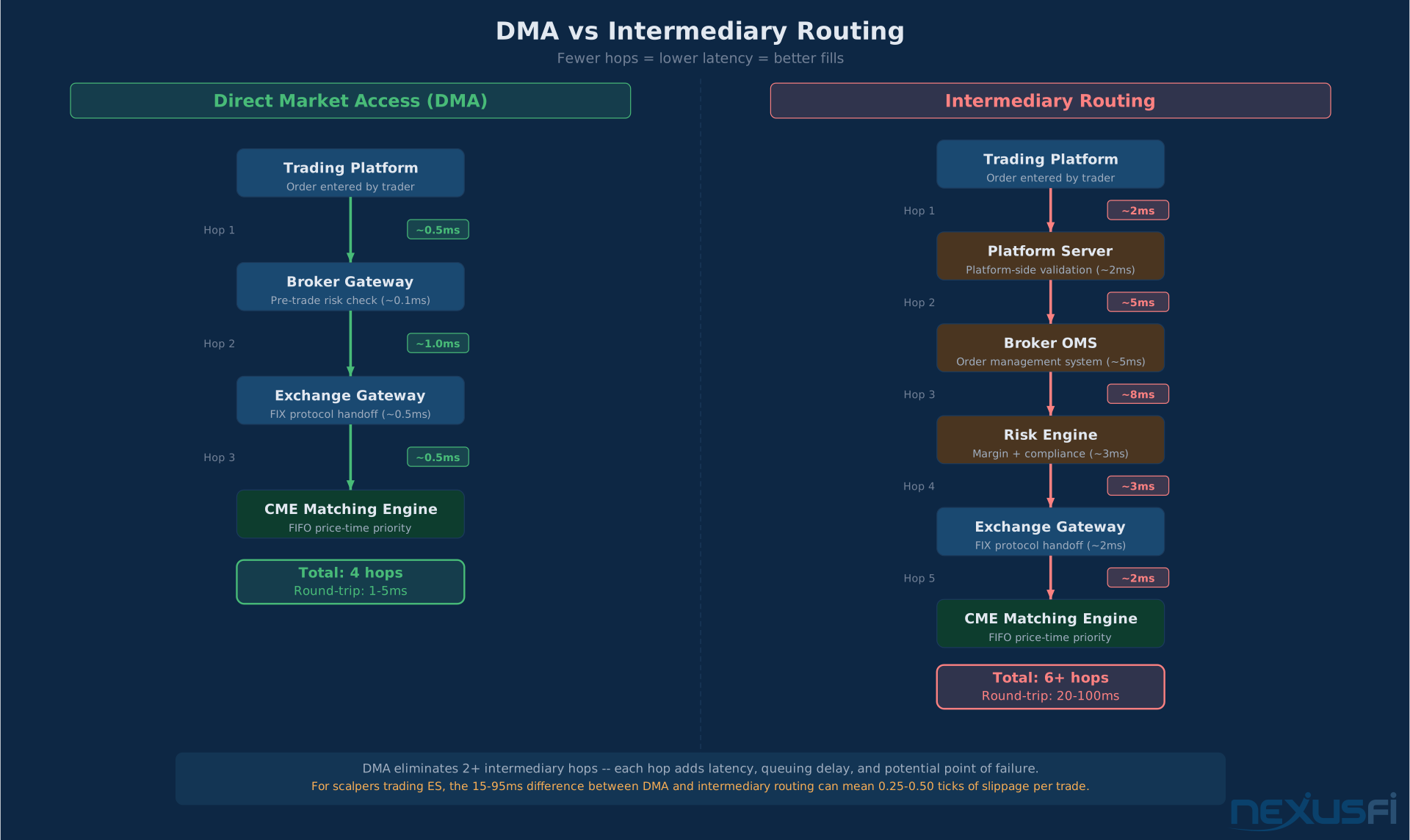
DMA (Direct Market Access): Your order goes through a thin risk layer and hits the exchange gateway with minimal processing. Brokers like Rithmic, CQG, and Trading Technologies provide DMA connections to CME. The risk checks are streamlined — often handled by the exchange gateway itself rather than a separate broker system.
As @Fat Tails noted in a [discussion about CME direct access][2], the DMA flow "passes through risk checking algorithms which do not delay the order." The checks happen in parallel with routing, not sequentially.
Intermediary routing: Your order passes through additional broker systems before reaching the exchange. This might include the broker's own matching engine (for internalization), additional compliance checks, or routing through a third-party clearing firm. Each layer adds latency.
The practical difference: DMA connections through Rithmic or CQG typically achieve 1-5ms round-trip from a Chicago-based server. Intermediary routing through web-based platforms or brokers with remote infrastructure can run 20-100ms.
For swing traders holding positions for hours or days, the difference doesn't matter. For anyone trading off the DOM, scalping, or running automated systems that need sub-second execution, DMA is non-negotiable.
The Clearing Firm Layer #
Even with DMA, your trades still need to clear. After execution, the trade enters the clearing process — and this is where the FCM's role as financial guarantor kicks in.
Here's what happens post-fill: The executed trade is automatically allocated to your specific clearing account at the FCM. The clearinghouse (CME Clearing) steps in as the central counterparty — it becomes the buyer to every seller and the seller to every buyer. Your FCM, not you, faces the clearinghouse. This is novation, and it's why FCM financial strength matters.
For DMA accounts, the clearing path is typically cleaner. Your broker-dealer or introducing broker (IB) works through an FCM that is a direct clearing member. Some firms like NinjaTrader have vertically integrated — they are the broker, the FCM, and the clearing member all in one. Others use a split model where an IB handles client relationships while an FCM like Dorman or Phillip Capital handles clearing. As @bobwest explained in a [NexusFi thread on order routing][8], understanding which FCM your broker uses matters because "some [platforms] may only work with particular routing firms."
The clearing layer adds no meaningful latency to your fills — it's a post-trade process. But it determines who holds your money, how margin is calculated, and what happens if the other side of your trade defaults. Pick an FCM with strong capitalization and a track record. It's not glamorous, but it's the foundation everything else sits on.
Co-location and Latency #
CME Group's primary data center is in Aurora, Illinois — about 25 miles west of downtown Chicago. This is where the Globex matching engines live. Everything in futures execution revolves around proximity to this building.
The latency hierarchy:
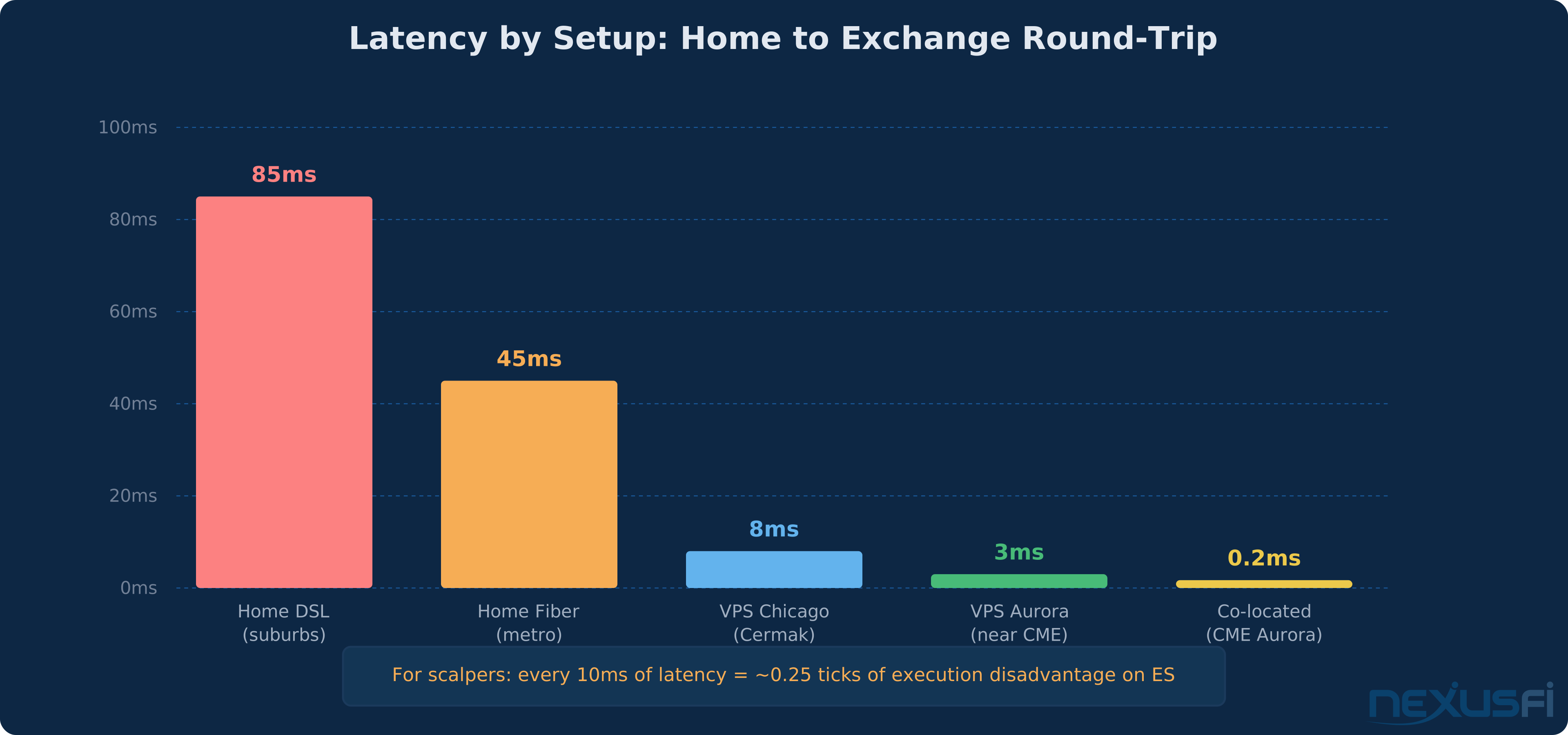
- Co-located in Aurora: Your server sits in the same data center as CME's matching engines. Round-trip latency: 0.05-0.5ms. Cost: $5,000-15,000/month for rack space, plus hardware and connectivity. This is HFT territory.
- VPS near Aurora: A virtual private server in or near Aurora, connected via low-latency fiber. Round-trip: 1-3ms. Cost: $50-200/month. Realistic for serious retail traders running automated strategies.
- VPS in Chicago (Cermak): 350 E. Cermak Road in downtown Chicago hosts a major data center where ICE's matching engines sit and CME maintains connectivity points. Round-trip to Aurora: 3-8ms. Cost: $30-100/month. As one [NexusFi forum member noted][3], "the data center across the street is a good option (1ms from 350 E. Cermak)."
- Home fiber (metro area): A residential fiber connection in a major metro area. Round-trip: 20-50ms depending on routing. Free (you're already paying for internet).
- Home DSL/cable (suburbs): Residential broadband. Round-trip: 50-100ms+. Add another 10-30ms if your broker routes through servers on the wrong coast.
The math that matters: On ES, one tick is $12.50. If your market order arrives 50ms late in a fast market moving 2 ticks/second, you're statistically giving up 0.1 ticks per trade — about $1.25. Over 20 trades/day, that's $25/day or $500/month. A $100/month VPS pays for itself in a week.
@hyperscalper laid it out clearly in a [NexusFi thread about micro scalping][4]: "Internet communication may appear to be fast, but the physical distance of communications can dramatically reduce the speed of data reception and order execution."
Where Slippage Actually Comes From #
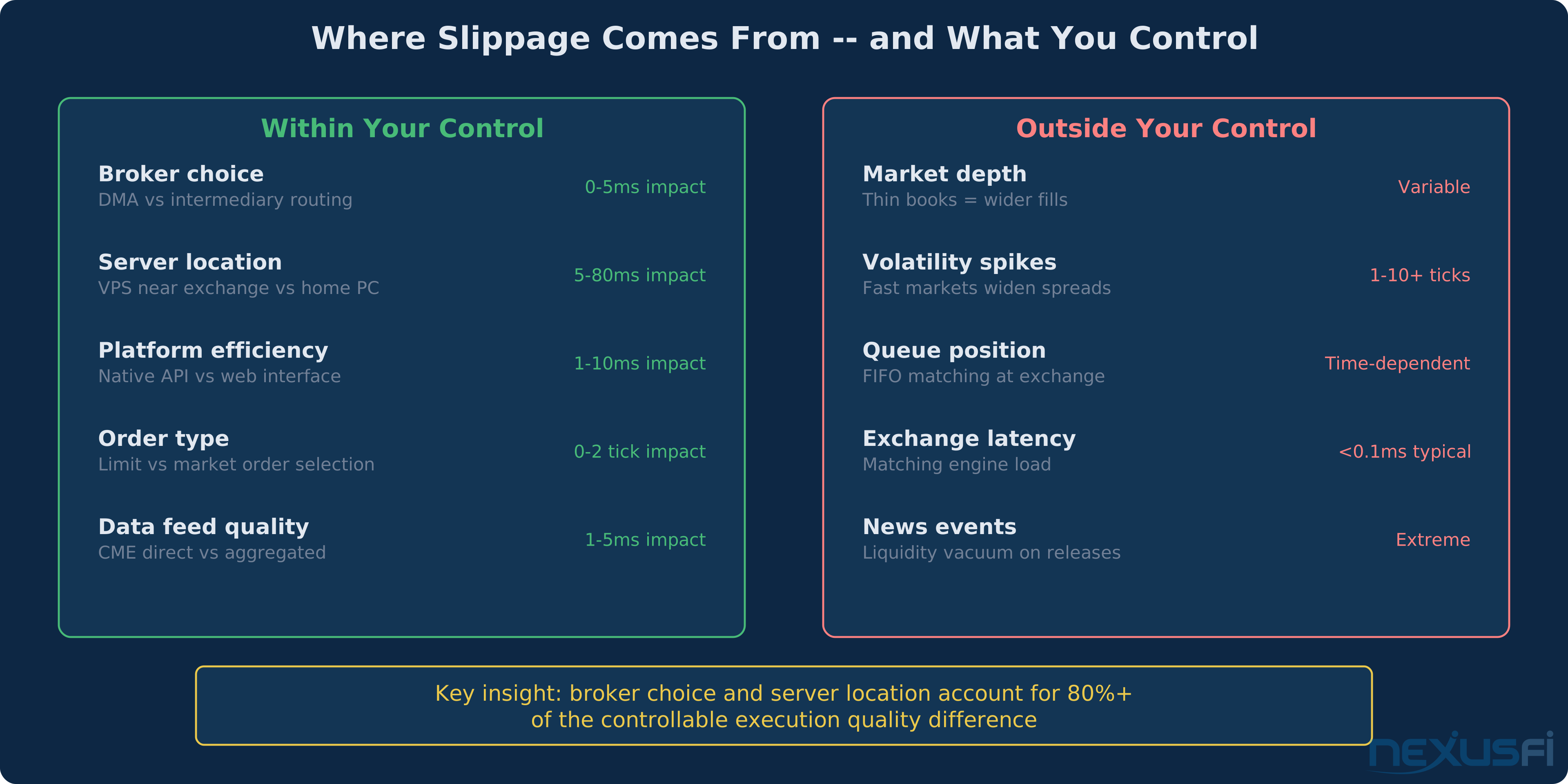
Slippage isn't one thing. It's a collection of delays and market conditions that each contribute to the gap between the price you expected and the price you got.
Controllable factors:
- Broker and routing choice. DMA through Rithmic vs intermediary routing through a web platform — this alone can be 5-50ms of difference.
- Server location. Running your platform on a VPS near the exchange vs your home PC. The single biggest controllable factor for most traders.
- Platform efficiency. A native C++ platform talking directly to a broker API processes orders faster than a browser-based interface making HTTP calls. NinjaTrader connecting via Rithmic is faster than NinjaTrader connecting via web-based broker APIs.
- Order type selection. Market orders guarantee a fill but accept whatever price is available. Limit orders control price but may not fill. Stop-market orders become market orders when triggered — in fast markets, the fill can be multiple ticks from the stop price.
- Data feed quality. If your market data arrives late, your trading decisions are based on stale prices. A direct CME data feed vs an aggregated/delayed feed makes a measurable difference.
Uncontrollable factors:
- Market depth. Thin order books mean your market order walks through multiple price levels. During Asian session or in low-volume contracts, a 10-lot market order can move ES a full tick.
- Volatility spikes. When the Fed announces, the book evaporates. Slippage during high-impact news releases can be 5-20 ticks on ES regardless of your infrastructure.
- Queue position. At the same price level, orders are filled in FIFO order. If 500 contracts are resting at a price and you're #350, you need the market to trade through 350 contracts before you get filled.
- Exchange latency. CME's matching engine has its own processing time, but it's sub-millisecond — irrelevant for retail traders.
As @bobwest explained in the [NexusFi brokers forum][5], slippage "has nothing to do with either your broker or your trading platform, but with the orders on the exchange, which are executed in an automated process that matches buys and sells."
That's half true. The exchange matching is outside your control. But the speed at which your order reaches the exchange is very much within your control.
Measuring Execution Quality #
Don't guess whether your broker's execution is good. Measure it.
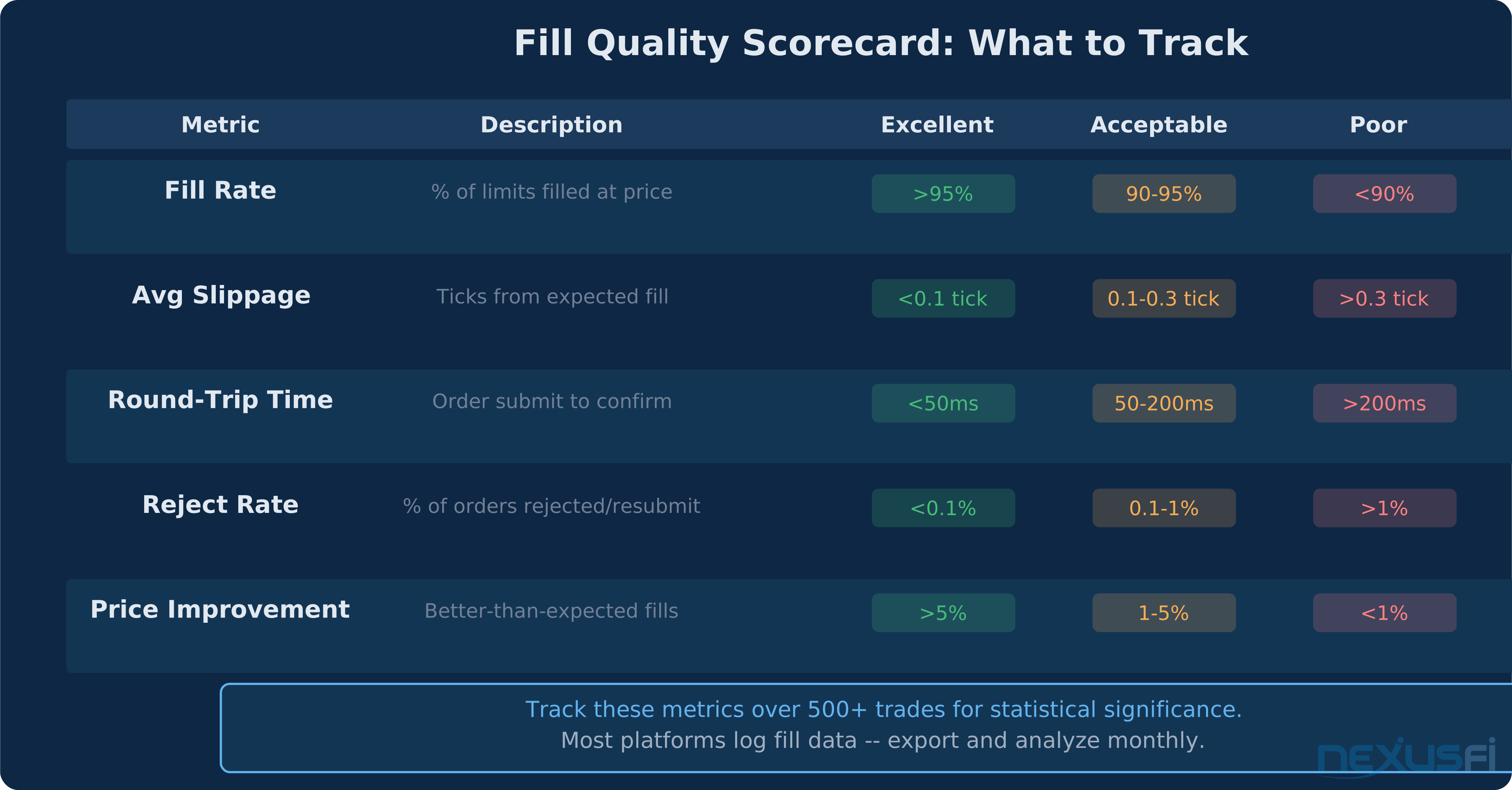
Fill rate: What percentage of your limit orders actually get filled? If you're placing limit orders at the inside bid/ask and getting filled less than 90% of the time, something is wrong — either your order is arriving late (queue position disadvantage) or your broker's connection to the exchange is slow.
Average slippage: Track the difference between your expected fill price and actual fill price across hundreds of trades. Market orders will always have some slippage, but if your average is consistently above 0.2 ticks on ES, investigate your routing.
Round-trip time: Some platforms log order timestamps. Compare the time you submitted the order to the time you received the fill confirmation. This includes exchange matching time, so focus on the trend rather than absolute numbers. If your average is above 200ms, your infrastructure needs work.
Reject rate: How often are your orders rejected by the exchange or broker? Rejects mean your order has to be resubmitted — double the latency. A reject rate above 1% indicates a problem with your broker's risk system or order formatting.
Price improvement: On limit orders, how often do you get filled at a better price than requested? This happens when your order arrives during a favorable book movement. Higher price improvement rates suggest your orders are reaching the exchange quickly.
How to track: Most platforms export trade logs. NinjaTrader's trade performance window, Sierra Chart's trade activity log, and TradingView's trade journal all provide the raw data. Export to a spreadsheet, calculate the metrics above, and review monthly. Compare across different trading sessions and market conditions.
Practical Application: Optimizing Your Setup #
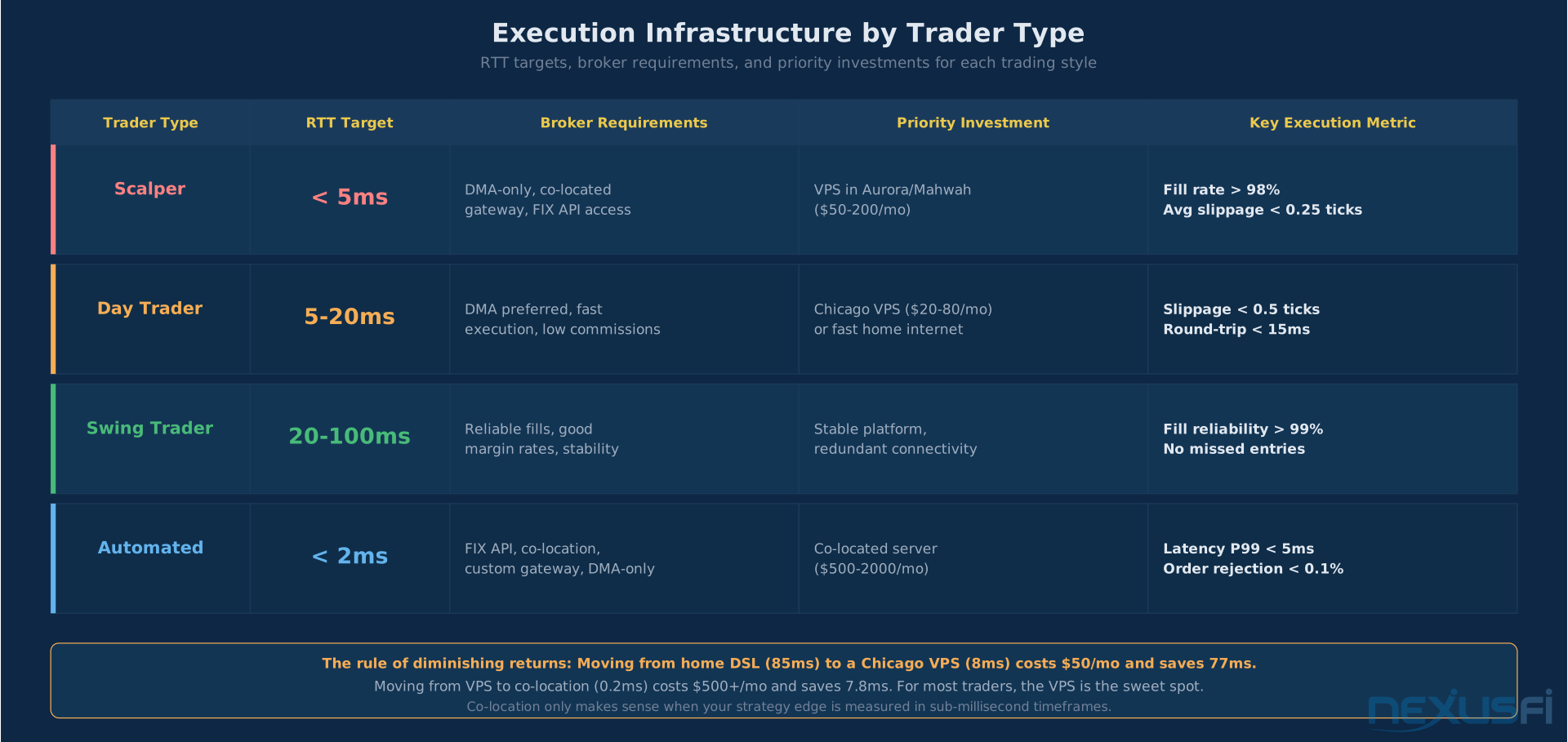
For discretionary scalpers (1-5 tick targets): Execution quality is your edge. Get a VPS in or near Chicago. Use a broker with DMA through Rithmic or CQG. Use a native platform — not web-based. Your total latency budget should be under 10ms. Every millisecond you shave off your round-trip translates directly to better fills.
For day traders (10-50 tick targets): Execution matters but isn't critical. A good home internet connection plus a DMA broker is fine. Focus more on data feed quality than raw latency. Make sure your platform doesn't freeze or lag during volatile periods — that's a bigger execution risk than network latency.
For swing traders (100+ tick targets): Execution quality is mostly irrelevant. Use whatever broker and platform you're comfortable with. The difference between a 5ms and 100ms fill path on a trade you're holding for three days is immaterial.
For automated systems: Run your strategy on a VPS near the exchange. Use native APIs (Rithmic RAPI, CQG API, Trading Technologies FIX) rather than platform wrappers. Monitor fill quality programmatically — set alerts for slippage spikes or reject rate increases. As @iantg shared while [building an HFT system on NexusFi][6], even "not super low latency" automated systems benefit from being "faster than NinjaTrader" through direct API access.
The bottom line: Match your infrastructure investment to your trading style. Scalpers should spend $100-200/month on a proper VPS and DMA connection. Swing traders shouldn't spend a dime beyond their existing setup. And everyone should track their execution metrics — you can't improve what you don't measure.
Knowledge Map
Prerequisites
Understand these firstReferences This Article
Articles that build on this topicCitations
- — Which the best faster VPS to retail (2022) 👍 8“You also need to think about price feed/data routing. Some data vendors have the price data route through their own servers.”
- — Faster than Rithmic ? CME direct rough cost ? (2012) 👍 5“The DMA flow passes through risk checking algorithms which do not delay the order.”
- — AMP discontinuing its co-location server? Which futures brokers offer co-location? (2021) 👍 1“The data center across the street is a good option (1ms from 350 E. Cermak).”
- — Discussion of a Micro Scalping Day Trading Facility (2021) 👍 2“Internet communication may appear to be fast, but the physical distance dramatically reduces speed of data reception and order execution.”
- — Ninjatrader Brokerage and Slippage (2022) 👍 5“Slippage has nothing to do with either your broker or your trading platform, but with the orders on the exchange.”
- — HFT Algo: anyone doing HFT here? (2022) 👍 3“HFT system using Rithmic RAPI. Not super low latency, but needs to be faster than NinjaTrader.”
- — CME Group: Submitting a Futures Order
- — CME Group: GLink Co-Location Connectivity Specifications
- — CFTC Regulation 1.73: Clearing FCM Risk Management