



Futures Trading Platforms: The Decision Framework for Choosing Your Trading Cockpit
Overview #
Your platform is your trading cockpit — the interface between your decisions and the market. Choose wrong and you'll spend more time fighting your tools than reading the tape.
Every futures trader faces this decision, and it's one of the most discussed topics on NexusFi — hundreds of threads, thousands of posts debating NinjaTrader vs Sierra Chart vs TradingView vs the dozen other options. The problem with most "best platform" articles? They're feature checklists that tell you nothing about what counts for YOUR trading.
This guide takes a different approach. Instead of comparing feature lists, it gives you a decision framework. The right platform depends entirely on how you trade — your execution style, your analytical methodology, and your automation needs. A DOM scalper and a swing trader using daily charts have completely different requirements. The "best" platform for one might be terrible for the other.
By the end of this article, you'll have a weighted scorecard tailored to your trading style that you can apply to any platform you evaluate. Not "Platform X is best" — but "here's how to figure out which platform is best for you."
Start With Your Trading Identity #
Before evaluating any software, answer four questions. They determine which evaluation criteria matter most for your specific situation.
What's your execution style? DOM/ladder scalpers need sub-100ms refresh rates and one-click execution — speed and order management are the #1 criteria. Chart-based discretionary traders need quality charting, reliable bracket orders, and clean visual layouts. Systematic/automated traders need a strong API, reliable strategy execution, and honest backtesting. Hybrid traders need solid execution AND automation, which narrows the field much.
What instruments do you trade? Single instrument vs multi-market, outrights only vs spreads and synthetics, micro contracts vs full-size. Some platforms handle micros poorly or lack spread construction tools.
What's your analytical approach? Pure price action traders have minimal indicator needs. Order flow and footprint traders need heavy data processing capabilities. Technical indicator traders need a solid indicator library. Market internals users (TICK, ADD, VOLD) need multi-data feed support.
What's your budget reality? Are you evaluating with a funded account where prop firm compatibility matters? Can you absorb $50-200/month in platform plus data costs? Is lifetime licensing appealing or do you prefer subscription flexibility?
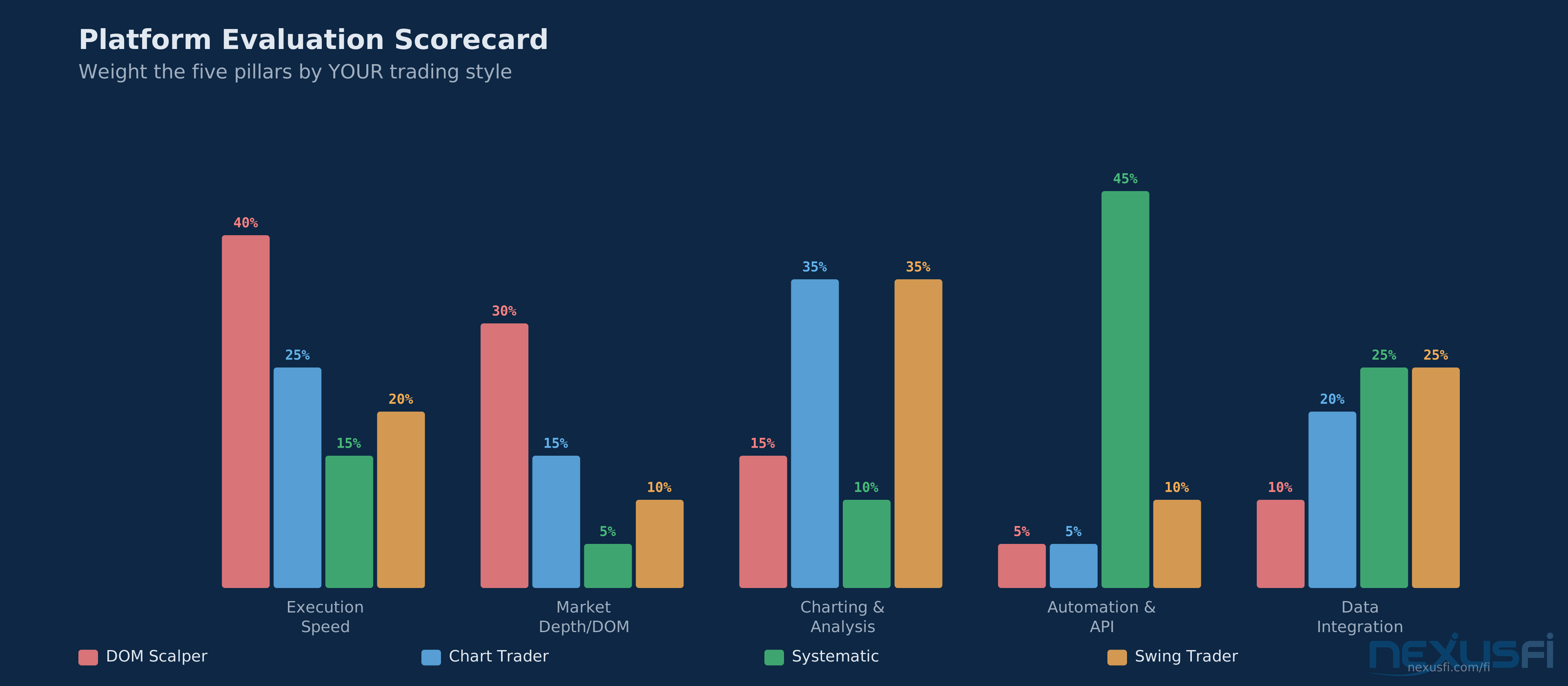
These answers create your personal weighting. A scalper might weight execution speed at 40% and charting at 10%. A systematic trader might weight automation at 50% and DOM tools at 5%. Write your weights down before you evaluate anything — otherwise you'll get seduced by features you don't need.
If you cannot answer all four questions in 30 seconds, lock in your trading identity before evaluating platforms. Without clear answers, you'll improve for features you don't need.
The Five Evaluation Pillars #
Ranked by importance for active futures traders. Every platform trade-off ultimately maps to one of these five areas.
Pillar 1: Execution Integrity and Speed #
This is the non-negotiable foundation. If the platform can't reliably get your orders to the exchange, nothing else matters.
What to test: Order acknowledgment speed — how quickly does the platform confirm your order is working? In fast markets, a 250ms delay vs a 40ms delay is the difference between getting filled and watching price run. Cancel/replace latency — when you need to pull an order, how fast does the platform execute? Stability under volatility — does the platform slow down, freeze, or disconnect during high-volume events like CPI, FOMC, or inventory reports? Reconnection behavior — when you lose connection briefly, what happens to your working orders? Server-side OCO orders mean your stops stay active even if your platform disconnects.
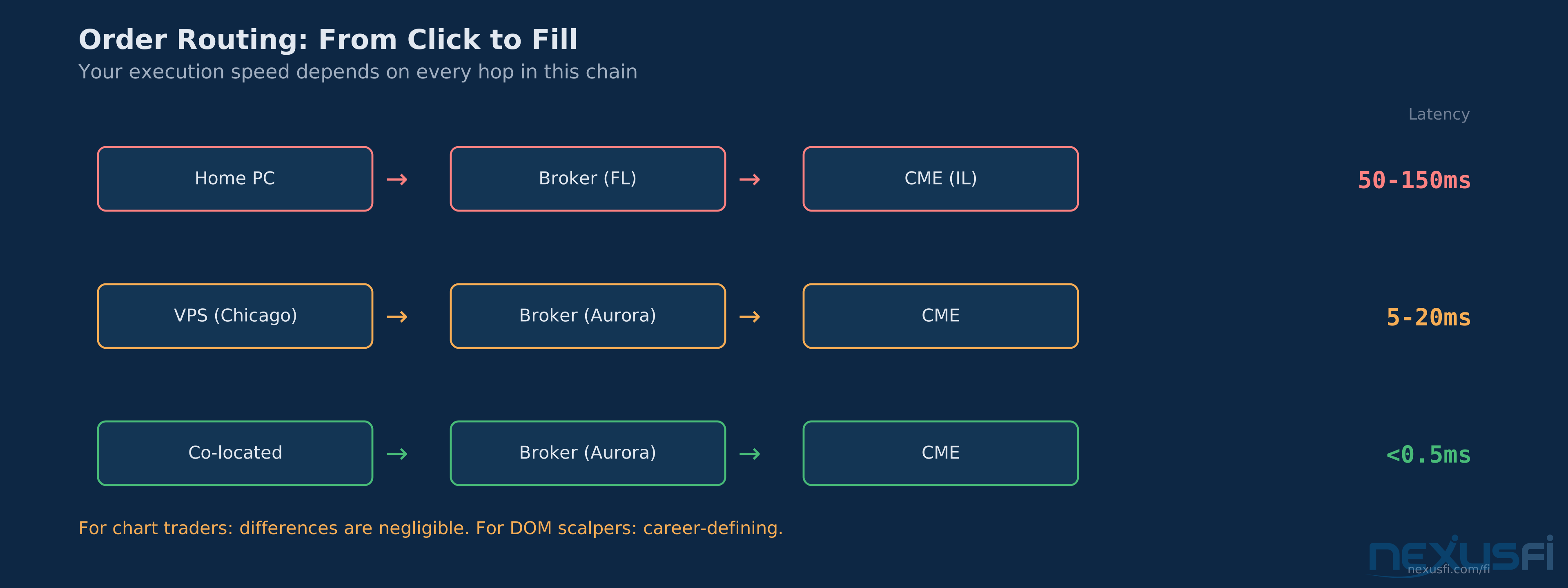
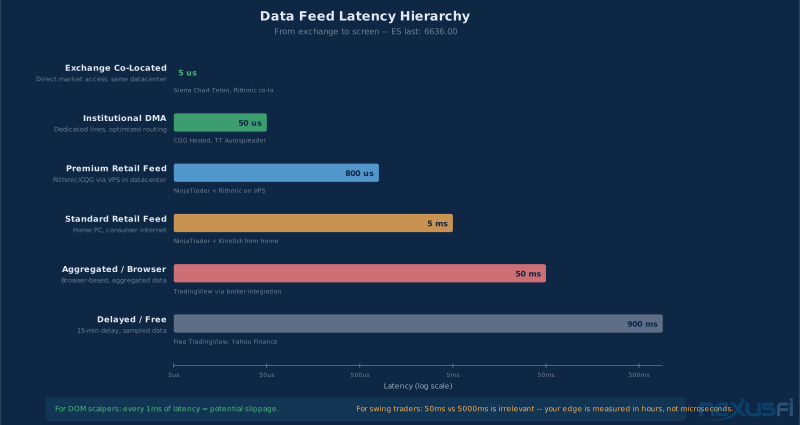
[1] The routing architecture between your platform, your broker, and the exchange determines your actual execution speed — not the platform's advertised refresh rate.
For scalpers specifically,
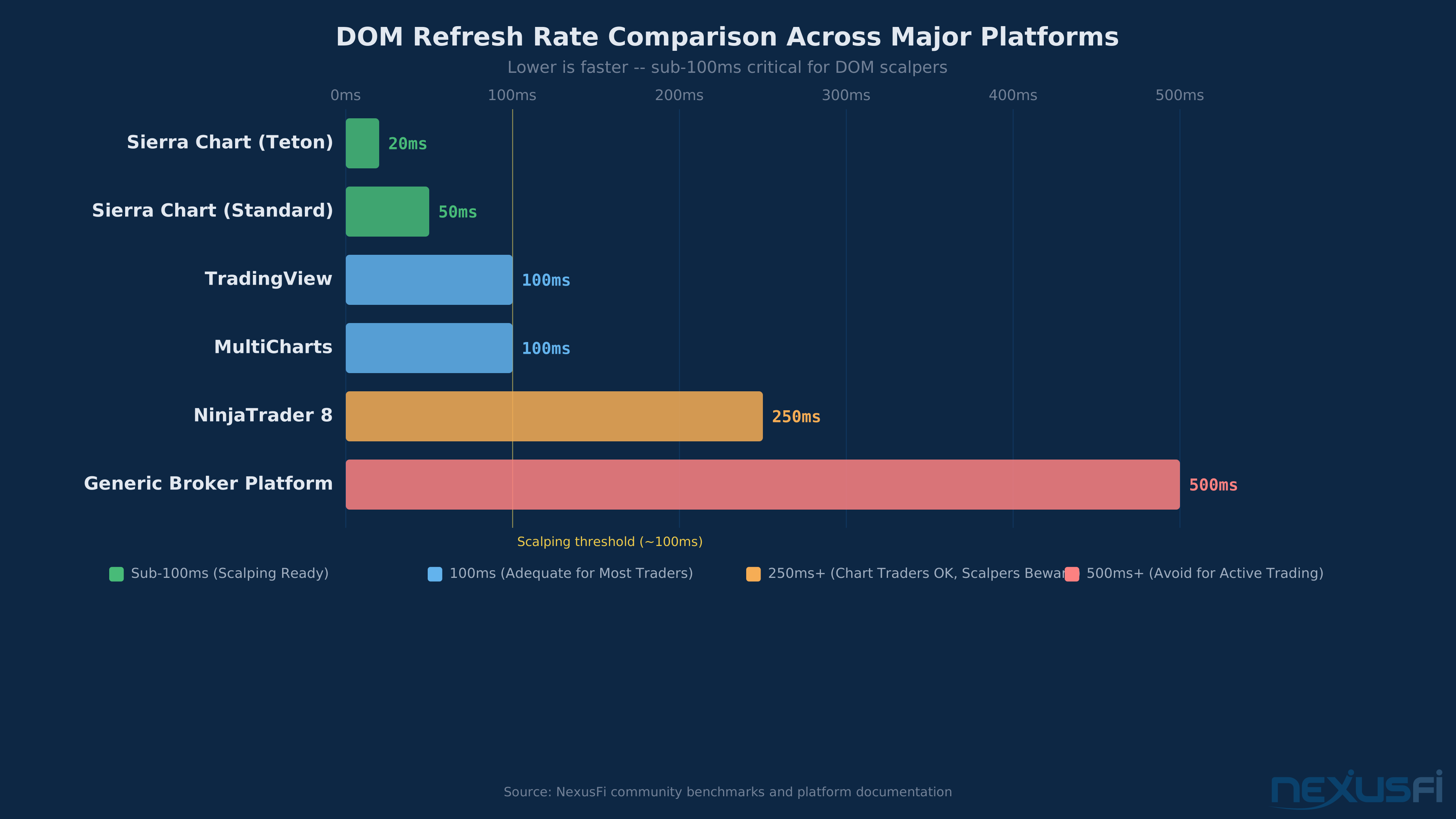
[2] On platforms like Sierra Chart, DOM refresh rates go as low as 20-50ms — a meaningful difference when working tight stops in fast markets.
[3] CME Group's Aurora co-location facility uses GLink — equidistant 10 Gbps connections providing equal latency to the Globex matching engine for all co-located participants regardless of rack position. [9]
Bottom line: For discretionary chart traders, execution speed differences between major platforms are negligible. For DOM scalpers, they're career-defining.
Do not test DOM speed on weekends with sim data — feed latency only appears with live data during RTH high-volume periods. Real-world execution speed differences between platforms only manifest under actual market conditions when live order flow is present.
Platform Snapshot: Execution Speed #
How the major platforms actually compare on execution and DOM responsiveness:
Sierra Chart — DOM refresh as low as 20-50ms. With Teton order routing (co-located at CME Aurora, IL), order-to-exchange latency drops below 500 microseconds. Written in C++ for raw speed. For DOM scalpers, this is the benchmark.
NinjaTrader 8 — Minimum DOM refresh of 100ms (configurable but with a floor). Supports CQG and Rithmic routing. Adequate for most discretionary traders, but scalpers consistently report it feels slower than Sierra in fast markets. The managed .NET runtime adds overhead compared to native C++.
TradingView — Browser-based architecture adds inherent latency. Execution happens through broker integrations (not native), adding another hop in the order path. Fine for swing and position traders — not suitable for tick-level scalping.
MultiCharts — Desktop-native with reasonable execution speed. Supports multiple broker connections simultaneously. Faster than TradingView, not as optimized as Sierra for pure DOM scalping. A solid middle ground for traders who need both execution and portfolio-level tools.
Pillar 2: Market Depth and Order Flow Tools #
If your methodology involves reading the tape, watching the order book, or using footprint charts, the platform's market depth tools become a primary differentiator.
What to evaluate: DOM implementation — is it static (price stays in place) or scrolling? Can you trade directly from it with one click? How configurable are the columns? Footprint and volume profile support — does the platform include these natively, or do you need paid add-ons? Native implementations are generally faster and more reliable. How the platform handles order flow heatmap visualization — the real-time rendering of limit order depth — is a major differentiator for tape readers. Time and sales filtering — can you filter by size, aggressor, and trade type? Bid/ask data storage — does the platform record and store historical bid/ask data for replay and analysis?
[4] When these tools come built-in rather than as paid add-ons, the total cost picture changes dramatically.
For traders not using order flow, this pillar matters less. A swing trader using daily EMAs doesn't need a sub-50ms DOM. Know your methodology before weighting this criterion.
Platform Snapshot: Order Flow Tools #
Native order flow capabilities vary dramatically — and so do the costs:
Sierra Chart — The order flow benchmark at retail price points. Footprint charts (Numbers Bars), volume profile, market profile (TPO), DOM heatmaps, and cumulative delta all come native in the $26/month Standard package. No add-ons needed for complete order flow analysis — this is the platform's defining strength.
NinjaTrader 8 — Basic DOM and time & sales included. Footprint charts and advanced order flow visualization typically require third-party add-ons like OrderFlow+ or Jigsaw Daytradr ($50-200+ additional per month). The ecosystem is large, but total cost for complete order flow analysis runs higher than Sierra's all-inclusive model.
Quantower — A newer entrant with strong native DOM, footprint, and heatmap tools built-in starting around $50/month. Growing community with modern UI design. Worth evaluating if Sierra's interface doesn't work for you.
TradingView — No native footprint charts or order flow visualization. Basic volume indicators and a standard DOM that varies by broker integration. Not a serious option for order flow methodology.
Pillar 3: Charting and Analysis Environment #
Every platform does charting. The differences that matter are in speed, flexibility, and the interaction between charts and execution.
What to evaluate: Chart loading speed — some platforms load historical charts in seconds, others take minutes with heavy data. Chart-to-execution integration — can you place, modify, and cancel orders directly from charts? Indicator ecosystem — large ecosystems like NinjaTrader's community library offer breadth, while tighter ecosystems like Sierra's native tools offer reliability. Multi-timeframe and multi-instrument layouts — how well does the platform handle workspace management with 6+ charts across multiple monitors?
Platform Snapshot: Charting Ecosystems #
Each platform's charting reflects a different design philosophy:
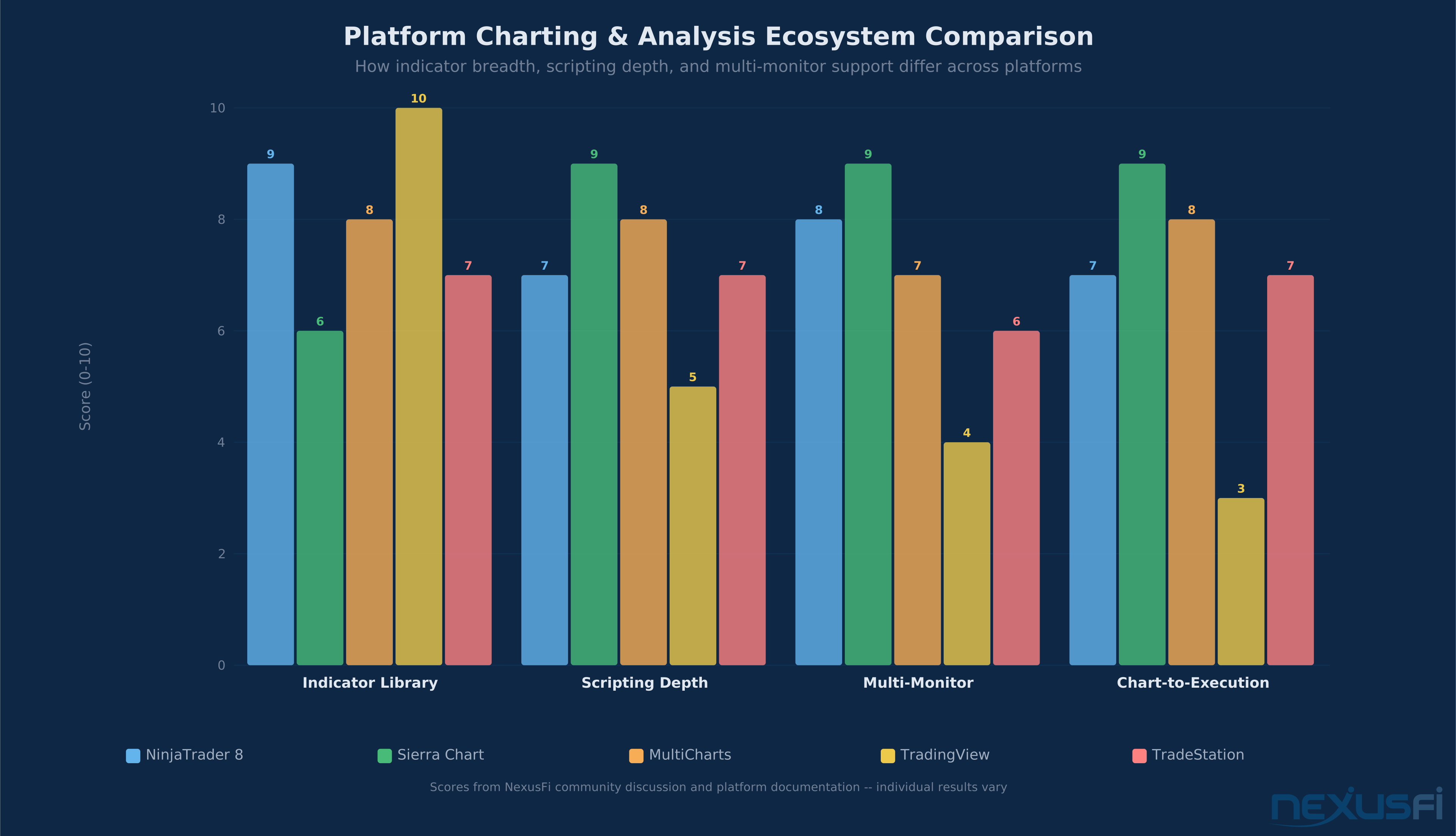
TradingView — The visual polish leader with 100,000+ community Pine Script indicators. Stunning chart rendering, intuitive drawing tools, and social sharing. Multi-asset coverage (stocks, crypto, forex, futures) in one browser tab. The trade-off: limited chart-to-execution integration depending on your broker, and Pine Script can't do everything NinjaScript or ACSIL can.
NinjaTrader 8 — Strong indicator ecosystem via NinjaScript (C#). Thousands of community indicators available, many free. Tight chart-to-execution integration — place, modify, and cancel orders directly from charts. Quality varies across the community library because C# is accessible enough that inexperienced developers can publish indicators with hidden performance issues.
Sierra Chart — Functional, utilitarian interface that prioritizes data density over aesthetics. Charts load fast (C++ native), and the built-in study library covers the full range of analysis tools. The UI is polarizing — some find it dated, others find it distraction-free. Custom studies via ACSIL require real C++ knowledge, which naturally filters for higher-quality code.
MultiCharts — Clean charting with EasyLanguage/PowerLanguage compatibility shared with TradeStation's ecosystem. Decades of accumulated EasyLanguage indicators work across both platforms. Good multi-timeframe analysis and multi-monitor workspace management.
Pillar 4: Automation and Programmability #
If you run — or plan to run — automated or semi-automated strategies, this pillar jumps to #1 in your personal weighting.
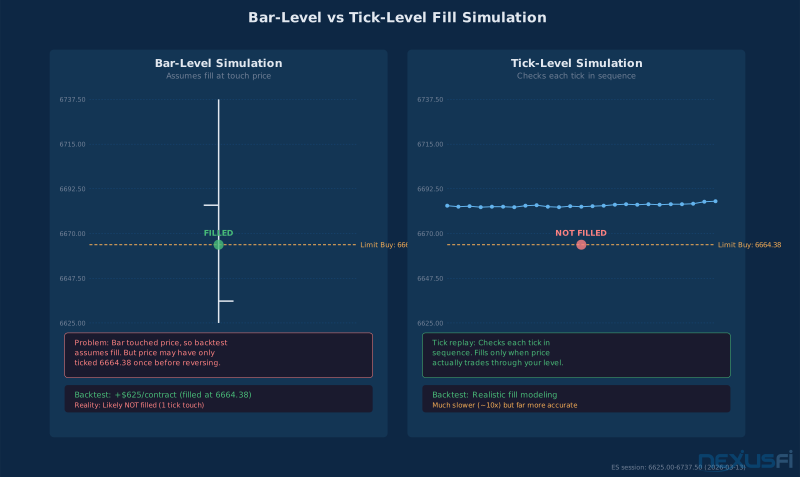
What to evaluate: Native scripting language quality — NinjaScript (C#), EasyLanguage (MultiCharts/TradeStation), ACSIL/C++ (Sierra Chart), Pine Script (TradingView). Backtest engine quality — does the platform support tick-level backtesting with realistic fill assumptions? Live/backtest parity — the strategy should behave identically whether backtesting or live. API access for external connections — can Python, C#, or other external systems connect for data and execution? Paper trading realism — does the sim engine use realistic fill modeling, or does it fill everything at the touch price?
Honest assessment: If you're writing strategies in Python and want low-latency direct API access, none of the retail platforms are ideal. You're looking at Rithmic's RAPI, CQG's API, or Trading Technologies' SDK — which are broker-level tools, not retail platforms. Retail platforms trade speed for convenience and visual tools.
Platform Snapshot: Scripting and Automation #
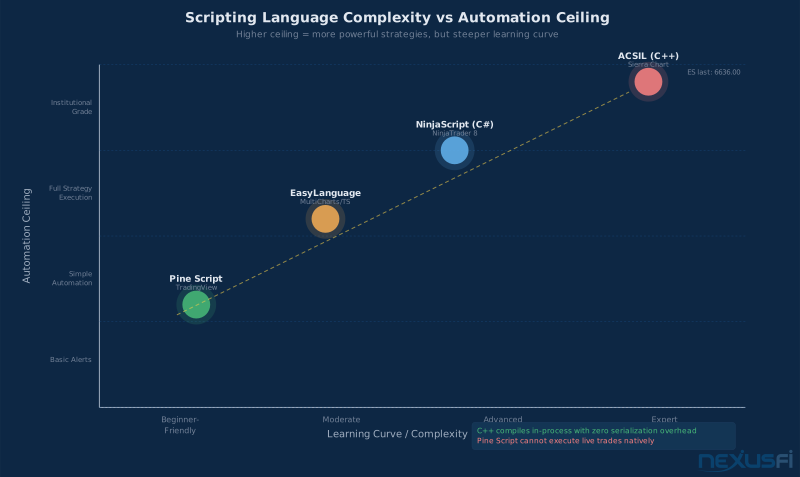
Your scripting language choice defines your automation ceiling:
NinjaTrader 8 (NinjaScript/C#) — The most accessible entry point for strategy automation. C# is widely known with extensive documentation. Built-in Strategy Analyzer handles backtesting with walk-forward optimization. Large community sharing free strategies. Trade-off: the managed .NET runtime adds overhead versus compiled C++, and the default backtester uses bar-level simulation (tick replay available but much slower).
Sierra Chart (ACSIL/C++) — Compiled native code running in-process with zero serialization overhead. The fastest automated execution of any retail platform. Studies have direct memory access to platform data structures. The cost: C++ is harder to learn, debugging less forgiving, and the community library is smaller — but what exists tends to be production-quality code.
MultiCharts (EasyLanguage/PowerLanguage) — The strongest portfolio-level backtesting in retail. Test strategies across multiple instruments simultaneously with portfolio-wide risk constraints. EasyLanguage is approachable for non-programmers. Tick-level backtesting with realistic fill assumptions. The platform of choice for systematic multi-instrument traders who want to test correlations and portfolio heat.
TradingView (Pine Script) — Easiest language to learn with the largest community. Excellent for prototyping, screening, and visual backtesting. Critical limitation for futures traders: no native automated execution. Live automation requires webhook alerts routed through third-party bridges like PickMyTrade, adding latency and failure risk. Strategy backtesting lacks tick-level resolution. Best for idea generation, not production automation.
Pillar 5: Data Integration and Reliability #
The platform is only as good as the data it displays. Feed quality, compatibility, and cost matter.
What to evaluate: Supported data feeds — CQG, Rithmic, Trading Technologies, IQFeed, and exchange direct. Which feeds does the platform support well? Data integrity — does it display all ticks accurately, or does it aggregate? For order flow traders, missing prints distort analysis. CME Globex publishes raw market data via MDP 3.0 — UDP Multicast delivering full Market By Order depth, 10-deep Market By Price, and Time and Sales; retail feeds aggregate and redistribute this, so feed quality depends on how faithfully they reproduce the source. [10] Historical data quality for backtesting — gaps, incorrect prices, and missing sessions create false signals. Contract rollover handling — how does the platform manage futures expirations? Automatic rollover by volume or date? Continuous contract construction for backtesting?
Platform Snapshot: Data Feed Compatibility #
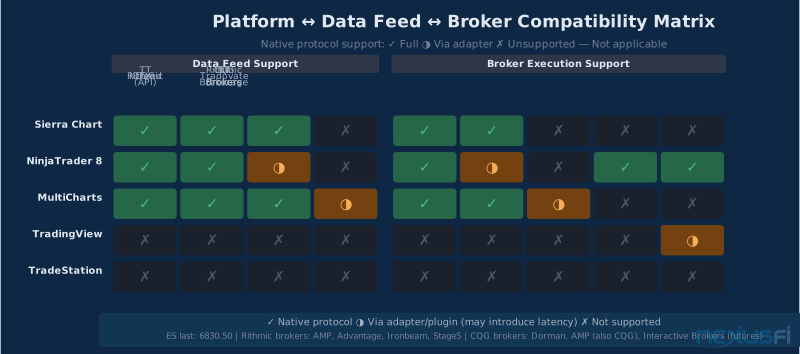
Your feed options depend on your platform:
Sierra Chart — Broadest native feed support: CQG, Rithmic (including Teton routing), Trading Technologies, IQFeed, Interactive Brokers, and exchange-direct connections. Automatic contract rollover by volume or date — a feature traders consistently cite as a major quality-of-life win. Clean tick-level data storage for replay and analysis.
NinjaTrader 8 — Supports CQG, Rithmic, and Kinetick (NinjaTrader's own bundled feed). IQFeed available via adapter. Kinetick provides a cost-effective option for traders who don't need institutional-grade tick-by-tick data. Historical data management is solid for backtesting.
MultiCharts — Supports CQG, Rithmic, IQFeed, Trading Technologies, and Interactive Brokers. Strong multi-feed capability — can display data from one feed while routing execution through a different broker. Useful for traders who want optimal data quality paired with their preferred execution venue.
TradingView — Uses its own aggregated data feed supplemented by broker-provided data. Limited feed choice — you get what TradingView or your connected broker provides. Historical data quality is generally good, but traders cannot select their preferred feed provider independently. For most chart-based analysis this is fine, but order flow traders need more control over their data source.
Total Cost of Ownership #
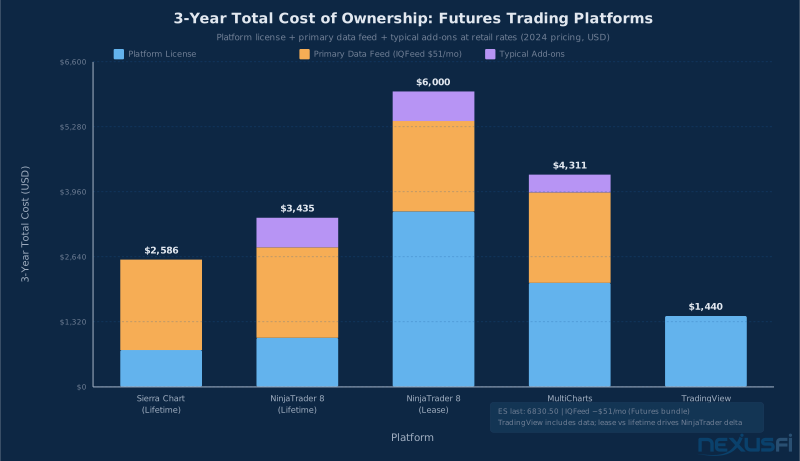
Platform cost isn't just the license fee. Here's the full picture most comparison articles ignore.
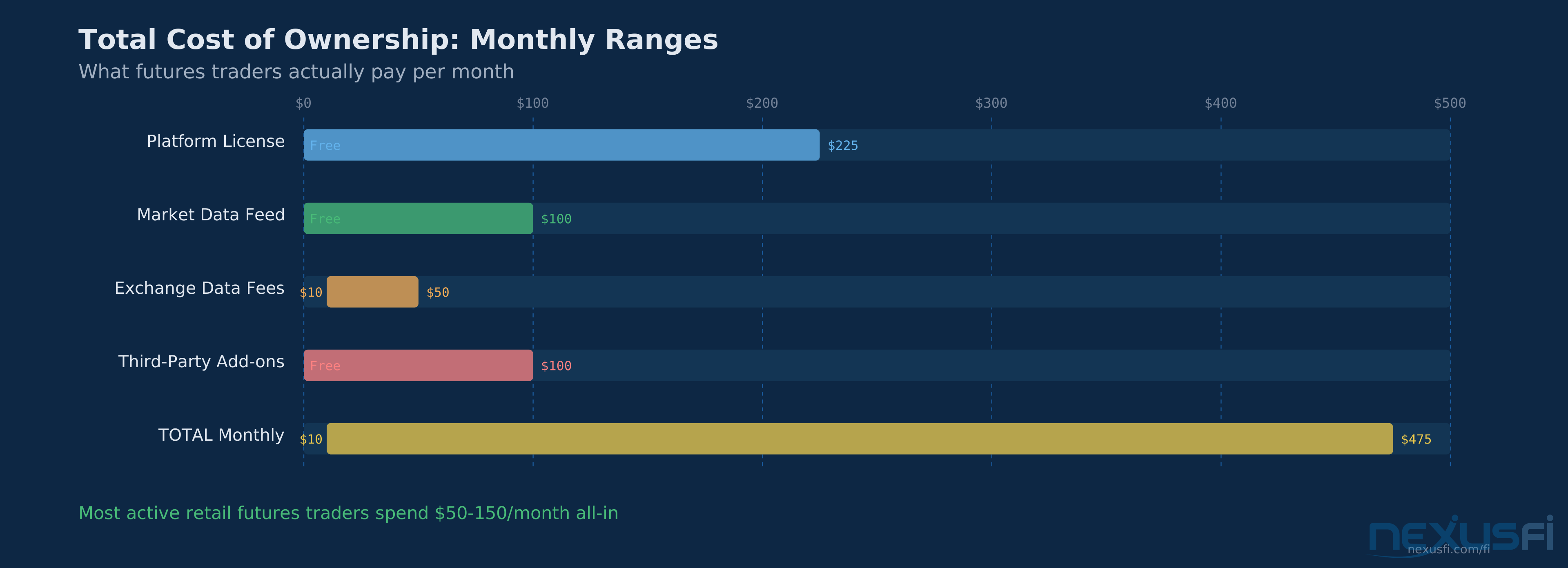
[8] Don't pay for features you don't use.
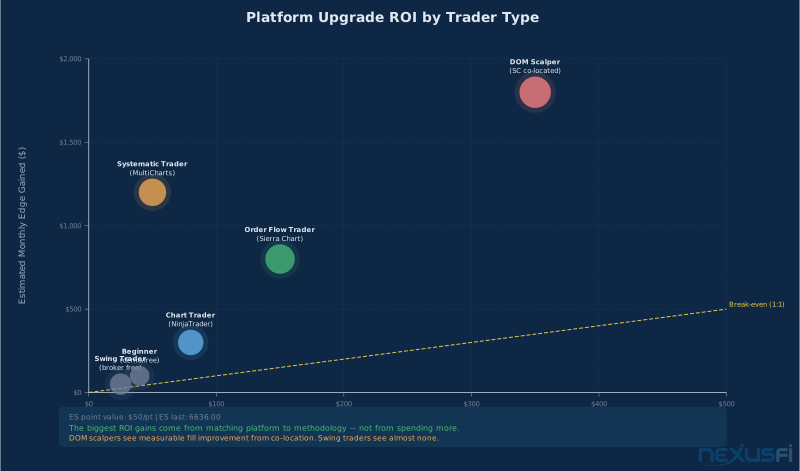
Start with your broker-provided platform to eliminate analysis paralysis. Upgrade when you hit a specific, concrete limitation — not before. The bottleneck in your first year is never the platform.
The Decision Framework #
Based on your trading identity, here's how to weight the five pillars and where to start your evaluation.
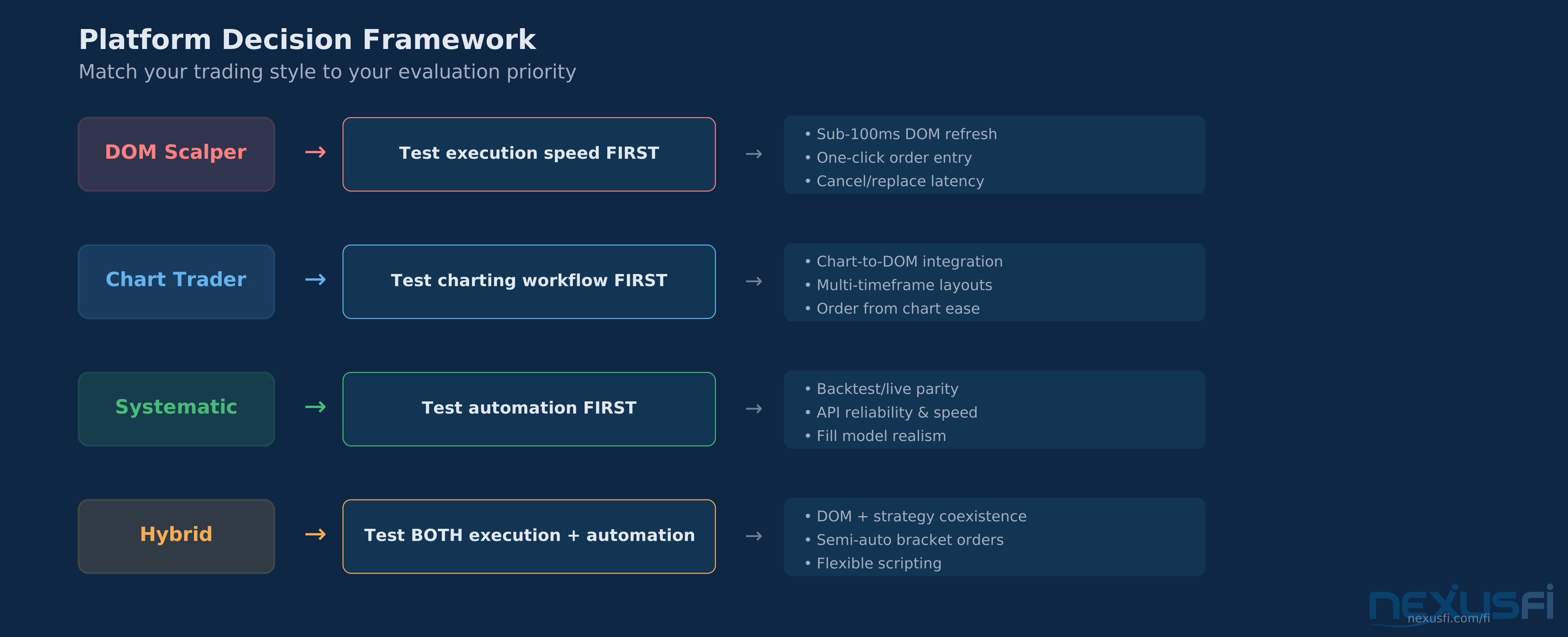
DOM scalper: Weight execution (40%), market depth (30%), charting (15%), automation (5%), data (10%). Start by testing DOM refresh rates and cancel/replace speed. Test with a live data feed during market hours — sim doesn't expose speed differences.
Chart-based discretionary trader: Weight charting (35%), execution (25%), data (20%), market depth (15%), automation (5%). Prioritize the platform that feels right for your analysis workflow. Try each for a week with real data. The "right" platform is the one that doesn't fight you.
Systematic/automated trader: Weight automation (45%), data (25%), execution (15%), charting (10%), market depth (5%). Evaluate native scripting language quality, backtest engine realism, and API stability. Test for live/backtest parity by running the same strategy on both and comparing fill-by-fill.
Prop firm trader: Start with compatibility. Which platforms does the evaluation firm support? Apex, BluSky, and others each support different platforms. Don't fall in love with a platform your eval firm doesn't connect to. Your broker selection adds another compatibility layer — broker routing and platform support overlap in ways that matter. Within compatible options, apply the framework above.
Tight budget: Start with broker-provided platforms or free tiers. These are legitimately usable for most trading styles. Upgrade when you hit a specific limitation — not before.
The Platform Evaluation Checklist #
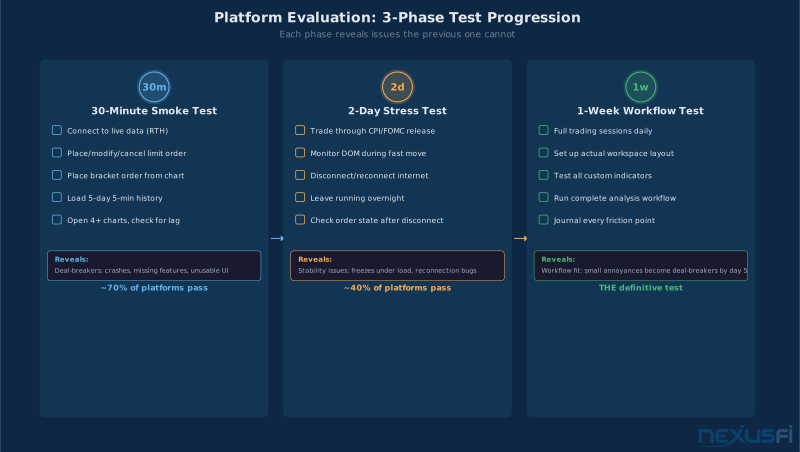
Don't trust feature lists. Test platforms yourself using this structured approach.
30-Minute Smoke Test — can you execute the basics? Connect to live market data during RTH. Place, modify, and cancel a limit order from the DOM. Place a bracket order from a chart. Load 5 days of 5-minute history and note how long it takes. Open 4+ charts simultaneously and check for lag.
2-Day Stress Test — how does it handle real conditions? Trade through a scheduled economic release (CPI, NFP). Monitor DOM behavior during a fast move. Disconnect and reconnect your internet — what happens to working orders? Leave the platform running overnight for session rollover stability.
1-Week Workflow Test — does it fit YOUR trading? Complete full trading sessions using only this platform. Set up your actual workspace layout with all instruments and timeframes. Test any indicators or custom studies you depend on. Run your specific analysis workflow. Journal any friction points.
The 1-week test is where platforms reveal their true nature. Small annoyances on day one become deal-breakers by day five.
When Platform Choice Doesn't Matter #
Here's what most platform comparison articles won't tell you: for the majority of futures traders, the platform differences are marginal. If you trade 5-minute charts with a few indicators and basic bracket orders, almost any major platform will serve you well.
Platform choice becomes critical only at the extremes — ultra-short-term scalping where milliseconds affect fills, systematic trading where backtest engine quality determines strategy viability, and order flow analysis where data integrity and visualization tools ARE the methodology.
For everyone else, pick a platform that feels comfortable, is supported by your preferred broker, and fits your budget. Then stop second-guessing and focus on your actual trading. The edge is in your methodology, not your software.
See Also
- Footprint Charts for Futures Trading — Deep dive into reading bid/ask volume at every price level
- Volume Profile Trading — Using volume-at-price distributions to identify value areas and high-volume nodes
- Order Flow Analysis — Reading real-time market participant behavior for trade decisions
- Order Flow Heatmap Visualization — Understanding limit order depth in real time
- Exponential Moving Average (EMA) — The intraday trend engine for futures traders
- Backtesting Trading Strategies — From hypothesis to validated edge
- How to Choose a Futures Broker — The decision framework for broker selection
Knowledge Map
Prerequisites
Understand these firstGo Deeper
Build on this knowledgeReferences This Article
Articles that build on this topicCitations
- — Which the best faster VPS to retail (2022) 👍 8“Your software creates an order, that order has to get to the exchange matching engine. How it gets there is called 'order routing'... Even though you're in Chicago, and the exchange is in Chicago, your order is actually travelling all the way to Florida and back.”
- — Is NT8 the right platform for scalping? (2021) 👍 2“I've been a point and click futures scalper for more than 10 years and NT is too slow if you are talking real scalping. The 250ms min refresh is a joke.”
- — When a stop loss market order doesn't trigger, does the broker/platform compensate? (2022) 👍 3“Sierra Chart (Teton Order Routing) and Rithmic both have latency under 500 microseconds as they are both co-located in CME's datacenter in Aurora, IL.”
- — Sierra vs. Ninja : why I chose ..... (2014) 👍 15“I'm switching to Sierra Charts for the following reasons: Included Volume and Market Profile Charts, Included Volume Footprint Charts, the CHART DOM -- nobody else has this -- a Static DOM... Automatic Rollover of Futures contracts based on volume or date.”
- — Overwhelmed! Which platform do I choose? Sierra? Ninja? MT5? (2018) 👍 11“The best advice would be to take each out for a spin with a demo version from a broker who provides it... Your personal assessment of the platforms -- what you personally like or don't like -- may be much more important than the views of others.”
- — Considering leaving Ninjatrader behind. Alternatives for futures trading? Tradovate? (2022) 👍 12“The 'problem' with NT is that it is 'too easy' to create new indicators... you can easily miss performance issues. SC is another beast -- you need to know C++, compile, not always easy to attach a debugger.”
- — Ongoing monthly costs to trade futures... (for newbie) (2010) 👍 10“Charting and execution platform -- can get for 'free' (included in higher commission) from some brokers. Data feed -- if included, is sufficient for 99% of people.”
- — Most important features in a trading platform? (2021) 👍 3“I became a price-action trader and then realized I probably had over-paid to look at 5m bars and an EMA line.”
- — Co-Location and Data Center Services
- — CME MDP 3.0 Market Data